MenuPhotoAI Alternative: MenuCapture vs MenuPhotoAI for Restaurant Menus
An honest MenuPhotoAI vs MenuCapture comparison: where MenuPhotoAI's free trial, re-edits, and done-for-you service fit, and where per-image pricing stops working for a full menu.
We make MenuCapture, so this is a comparison written by a competitor. We still want it to be fair, because MenuPhotoAI and MenuCapture aim at the same owner: someone with phone photos that are not good enough for delivery apps. The two tools take different routes and sit at very different price points. This page is an honest look at where MenuPhotoAI is the right call as an alternative, and where its per-image model stops fitting a real menu.
Who MenuPhotoAI is genuinely good for
MenuPhotoAI (menuphotoai.com) transforms food photos into styled shots, and it offers a few things MenuCapture does not. These are real, and worth weighing.
- A real free trial. The free plan includes 5 test images, so you can judge the output before paying anything. That lowers the risk of committing to a tool you have not seen work on your food.
- Re-edits included. Each image comes with free re-edits, typically two, which softens the sting of per-image pricing when a shot needs a small adjustment.
- A styled preset library. 8 delivery styles and 18 product photography styles, plus a style-match mode. If you want a designed look quickly, that catalog gets you there.
- A done-for-you option. You can email your photos and get enhanced versions back in 24 to 48 hours, quoted separately. For an owner who wants zero hands-on time, that is a genuine service MenuCapture does not offer.
If you would rather hand the work off entirely, or you only need a handful of styled photos and want to try before you buy, MenuPhotoAI has a real answer for you. We would point you to it for that job.
Where MenuPhotoAI breaks down for a full restaurant menu
The issue is the meter, not the output. Per-image pricing shapes how you behave in ways that hurt a menu project.
- Per-photo cost adds up. As of July 2026, Starter works out to about $1.56 per image and Enterprise about $0.89. A 50-dish menu on the Starter plan takes two billing months just to cover one pass, before any experimenting.
- Image caps make you ration. With 25 images a month on Starter, you start skipping the third attempt that would have nailed a shot, because that attempt eats into next week's dishes. The included re-edits help, but once you are past the two-per-photo allowance, adjustments count against the plan again.
- Presets over precise control. Styles get you a look fast, but if you want one specific change ("remove the napkin, keep everything else"), a preset is a blunt instrument. And the further a style transformation moves the plate from the real dish, the more you should double-check it still matches what you serve on delivery apps.
None of this makes MenuPhotoAI a weak tool. It makes it a per-image, style-first service, which is a different shape from editing a live menu over and over, where the retries are the job rather than an exception to it.
What changes when you edit your real photos with MenuCapture
MenuCapture is prompt-based editing of your real photos. Upload the photo, type the change you want, get the result in about 30 seconds. There is no per-image meter and no preset to settle for.
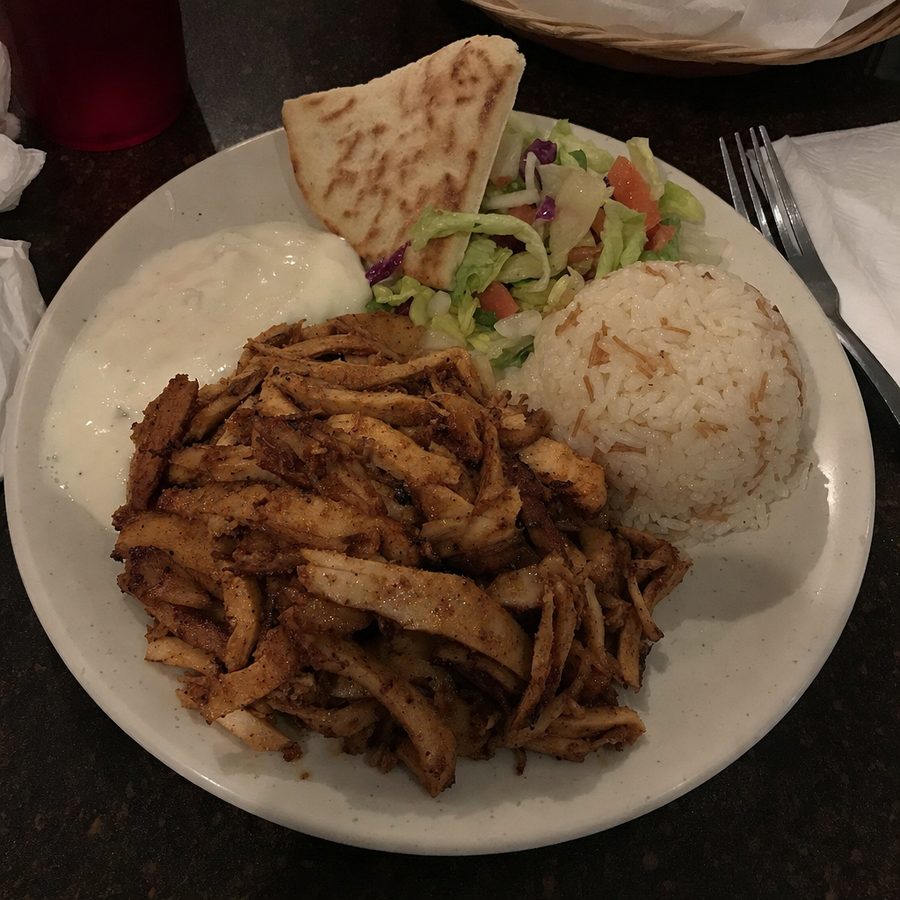
Here is one edit. The sliced chicken, rice, salad, garlic sauce, and pita are the same shawarma plate. Only the uneven lighting and the cluttered table changed.
What MenuCapture's edit looks like
Before
After
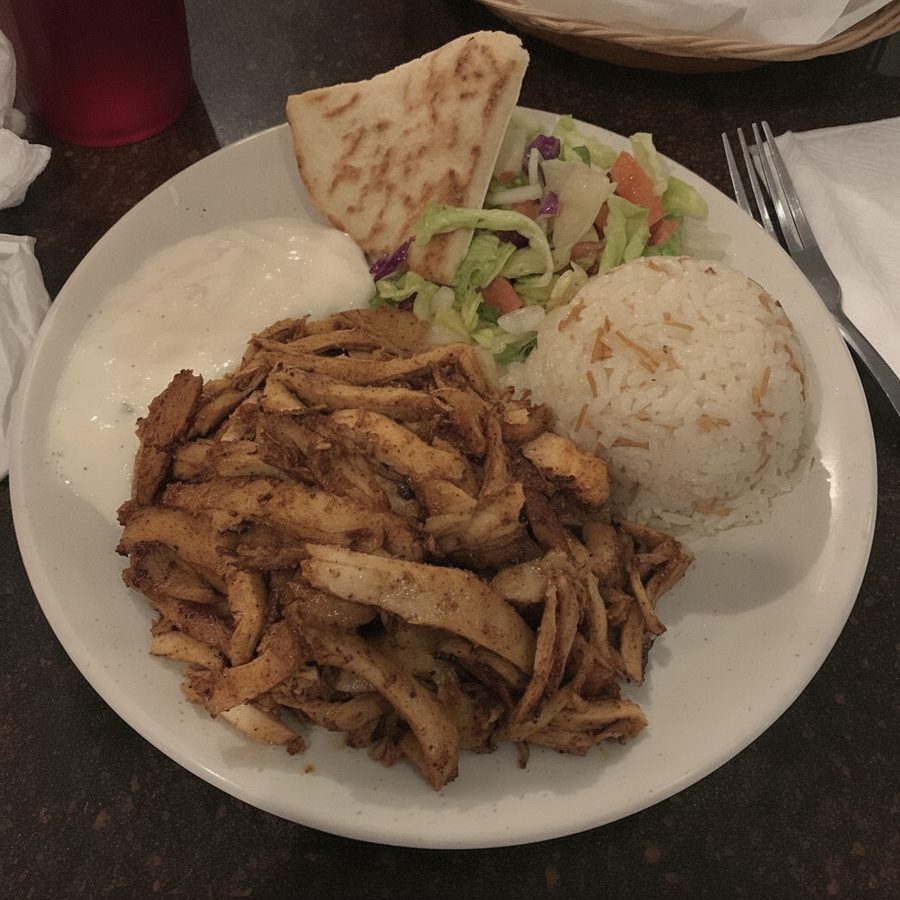
Uneven lighting evened out and the table tidied from one phone photo, with the plate itself left exactly as served. Actual MenuCapture output: the original phone photo and the MenuCapture edit. This demo shows our tool, not the competitor's.
- $9 per week or $159 per year, with up to 1,500 edits per month. At full use that is under a cent per edit.
- Precise control. You describe the edit in plain words instead of choosing the nearest preset, so you change one thing and leave the rest alone.
- Real dish, every platform. The output is your photo, improved, so it stays compliant on DoorDash and Uber Eats and is yours to use on Google, Instagram, your site, and print.
MenuCapture vs MenuPhotoAI, side by side
Accurate for both tools as of July 2026.
| What matters | MenuPhotoAI | MenuCapture |
|---|---|---|
| Pricing model | Per-image plans | Flat time-based plan |
| Free trial | 5 test images | See pricing page |
| Entry price | $39/mo Starter, 25 images | $9 per week or $159 per year |
| Top listed tier | $89/mo Enterprise, 100 images | Up to 1,500 edits per month |
| Approx. cost per image | About $0.89 to $1.56 | Under a cent at full monthly use |
| Cost of a retry | 2 free re-edits, then metered | Included |
| How you direct it | 8 delivery + 18 product styles | Plain text prompts |
| Speed | Styled render | About 30 seconds per edit |
| Done-for-you service | Yes, quoted separately | No, self-serve only |
| Source fidelity | Style-first, verify against the plate | Edits your real photo only |
| Usage rights | Yours to use | Yours on every platform |
What a 50-dish menu costs on each
Put a real project through both tools instead of trusting the per-image sticker. Take a 50-dish menu and allow three attempts per dish, because the render you keep is rarely the first one. That is 150 images.
On MenuPhotoAI, one clean pass of 50 dishes already exceeds the 25-image Starter plan and the 50-image Professional plan's monthly count, and 150 images with retries pushes you onto the $89 Enterprise plan (100 images) plus a second billing month, or a higher tier, just to finish the first version (pricing as of July 2026). The two free re-edits per image soften small tweaks, but the moment you want a genuine third or fourth attempt at the shot, you are back to counting against the plan. A seasonal menu change starts the meter over.
On MenuCapture, those same 150 edits fit inside a single $9 week, because the plan covers up to 1,500 edits per month and retries do not count separately. You can run a stubborn dish ten times and it costs the same as running it once.
MenuPhotoAI's done-for-you service is a different value entirely, and if handing off the work is what you want, that math changes. But if you are doing the editing yourself, the per-image plans and a retry-heavy menu project simply do not fit together the way a flat plan does.
Stick with MenuPhotoAI or switch to MenuCapture?
Stick with MenuPhotoAI if you want someone else to do the editing (the done-for-you service is a real advantage), or you only need a small styled batch and want a free trial first. For a hands-off owner, paying per image is a fair trade for not touching the software at all.
Switch to MenuCapture if you are editing a whole menu, you want to iterate until each plate is right without watching an image count, and you want precise control over exactly what changes in the photo. On that work, a flat $9 per week is dramatically cheaper than per-image plans, and prompt editing keeps the dish faithful to what you serve.
One nuance worth being fair about: the two tools are not only competing on price, they are competing on how much work you want to do. MenuPhotoAI's done-for-you service is a real answer for an owner who has no time and no interest in learning software, and no flat self-serve plan replaces having someone else do the editing. If that describes you, the per-image cost is buying convenience, not just pixels, and that can be money well spent. MenuCapture is built for the opposite owner: the one who wants to sit down with a menu's worth of photos, make the changes themselves in plain language, and not think about an image counter while they do it. Pick the tool that matches how hands-on you actually want to be, not just the cheaper number.
Compare the whole field in our AI menu photo tools roundup, and see the weekly and yearly options in full on MenuCapture's pricing. To try an edit on a photo you already have, start from the MenuCapture home page.