Booth.ai Alternative: What to Use for Restaurant Menu Photos After the Shutdown
Booth.ai shut down in May 2025. An honest guide to replacing it: where e-commerce sellers should go, and why restaurants should pick a tool that edits real photos, like MenuCapture at $9 per week.
MenuCapture builds this page, and we make an AI menu-photo tool, so weigh that as you read. Booth.ai shut down in May 2025, so this is not a head-to-head with a live product. It is an honest guide to replacing it: where e-commerce sellers should look, and why restaurants that used it for food should pick a different kind of tool entirely. If you landed here searching for a Booth.ai alternative, the short version is that the service is gone, and if food was your use case there was always a better-fitting option.
Replacing a tool that has shut down is a different task from switching between two live ones. There is no export to migrate and no account to cancel, but there is a choice to make with fresh eyes, and the closure itself is a useful prompt to make that choice deliberately rather than reaching for the nearest lookalike. The rest of this page is about choosing well, split by the two audiences Booth.ai served.
What Booth.ai was genuinely good for
Booth.ai deserves a fair account rather than a shrug. It was a generative AI product-photography startup, founded in 2022 and part of Y Combinator's Winter 2023 batch. You uploaded a product shot and it generated lifestyle scenes around it: shoes on a beach, a mug in a cozy kitchen. It aimed at e-commerce sellers who wanted studio-style imagery without booking a studio, and for that audience the pitch made sense. A single product photo could become a catalog of staged scenes in minutes.
That is a real capability, and it is why the honest first question when replacing Booth.ai is not "what is cheapest" but "what were you actually using it for." A tool built to invent scenes around a product is a good fit for some sellers and the wrong fit for others, and the shutdown is a chance to choose deliberately instead of by habit.
It is also worth being honest about what Booth.ai was not. Because it generated scenes around a product, the output was a new image rather than a faithful edit of the original photo. For e-commerce that was often the point: a seller wanted variety, not fidelity. For a restaurant, that same trait is a liability, which is the thread this page keeps returning to. Whether generation is a feature or a flaw depends entirely on whether your images have to match a real thing a customer will receive.
Why the shutdown changes how you should choose a replacement
The service went offline in May 2025, reportedly with little notice to users. That timing carries two practical lessons for anyone picking what comes next.
- Own your files. If your images live only inside a SaaS tool, a shutdown takes them with it. Anything not downloaded before Booth.ai went dark is likely gone. Whatever you choose next, download full-resolution copies and confirm you hold the usage rights, so the next closure is an inconvenience rather than a loss.
- Watch the category churn. AI photo tools launch and fold quickly. Tools priced sustainably and focused on a real niche tend to outlast broad "generate anything" plays. That is worth weighing alongside features when you commit a workflow to a product.
There is also a third consideration that only applies to one group of former Booth.ai users, and it is the important one for restaurants.
How to choose a Booth.ai replacement in three steps
If you strip the panic out of a shutdown, picking what comes next is straightforward. Three questions settle most of it.
First, recover and secure what you can. Gather any full-resolution files you downloaded before Booth.ai went offline, confirm you still hold the usage rights to them, and treat that library as the baseline you are replacing. Anything you cannot find is a reminder to insist that the next tool lets you download and keep originals.
Second, match the replacement to the actual job, not to the old brand name. Booth.ai served two very different needs under one roof: staged scenes for online-store products, and, for some users, food. Those needs point to different tools now. A seller wanting lifestyle product shots is looking for a generator; a restaurant wanting menu photos is looking for an editor. Naming the job first keeps you from buying the wrong category out of habit.
Third, weigh sustainability alongside features. The category churns, and a tool priced sustainably around a clear niche tends to outlast a broad "generate anything" play. That is not a guarantee, but paired with owning your files it means the next closure, if it comes, is an inconvenience rather than a loss. With those three answered, the two audiences below know where to go.
What editing real photos changes for restaurant menus
Restaurants have a constraint e-commerce sellers do not: delivery platforms require menu photos to depict the real dish a customer receives. A generated image of food you never plated can get flagged, and worse, it sets an expectation your kitchen never agreed to. That is the core reason a Booth.ai-style generator is the wrong replacement for food, no matter how good the scenes look.
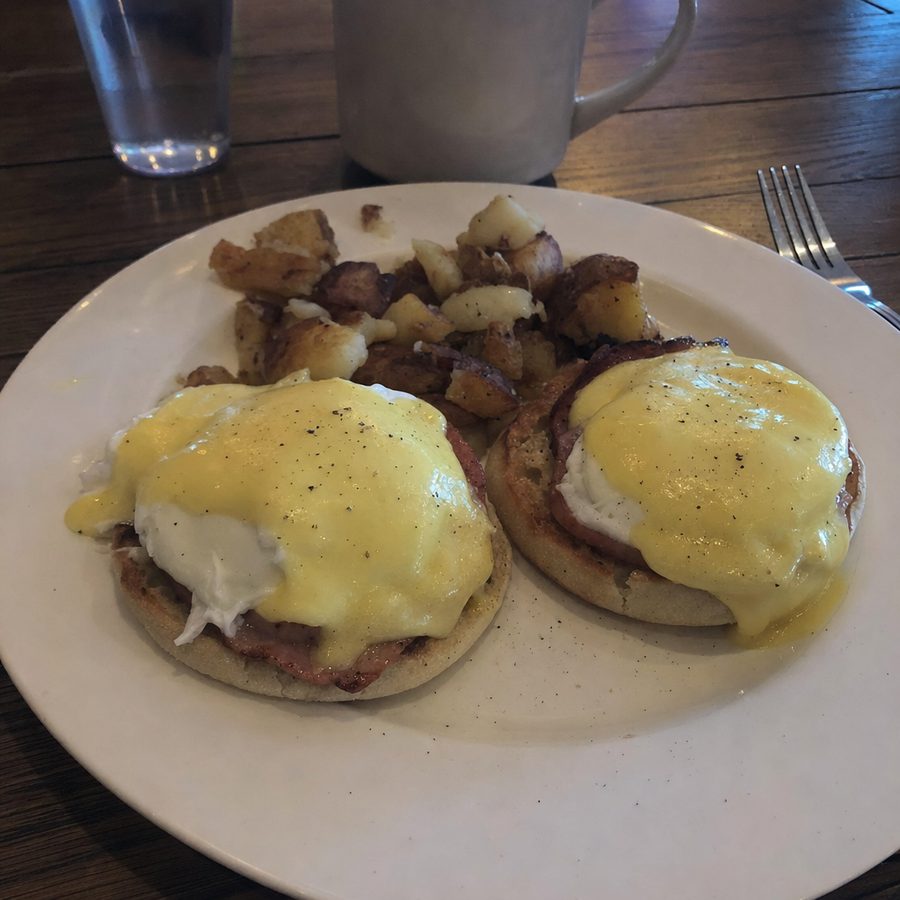
An editor works the opposite way. You upload a real photo of your dish, a phone photo taken under normal light is fine, and you type the edit you want: better lighting, a cleaner background, a menu-ready crop. The result comes back in about 30 seconds, and it is still your dish, so it stays compliant on DoorDash and Uber Eats and the files are yours across delivery apps, Google, Instagram, your website, and print. The example below is MenuCapture's own output from exactly that loop.
What MenuCapture's edit looks like
Before
After
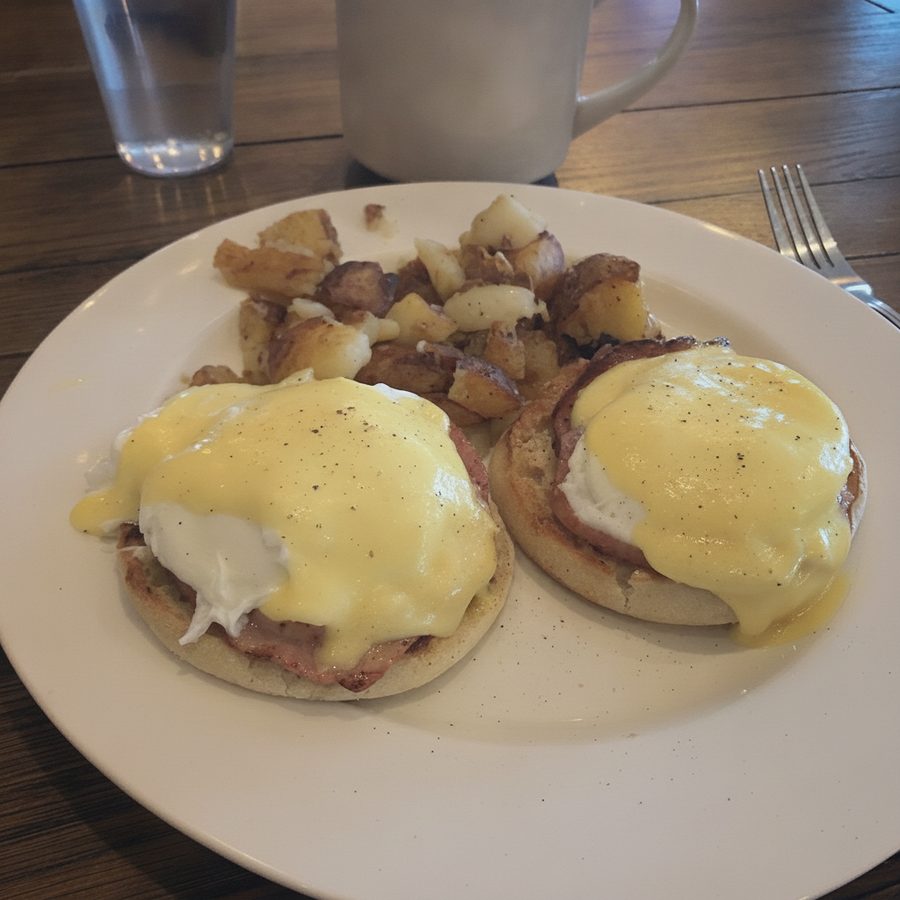
A dim cafe photo of eggs Benedict, relit and evened out while the plate itself stays exactly as served. Actual MenuCapture output: the original phone photo and the MenuCapture edit. This demo shows our tool, not the competitor's.
Picture the practical version. A cafe reopens its brunch menu and needs eggs Benedict, a couple of toasts, and three specials to look right across its delivery listings. With a generator, each dish becomes a staged invention that may or may not resemble the plate that leaves the kitchen, and a platform reviewer can flag the gap. With an editor, the cook photographs each plate at the pass, the owner brightens and tidies the shot, and the listing shows the exact dish a customer will receive. Same goal, opposite method, and only one of them is safe for a menu.
That is the whole difference for a menu: MenuCapture improves a photo of food you actually cooked rather than composing a scene around it, and you can see how the flat plan works on the pricing page.
Booth.ai vs the alternatives: how to think about the swap
Booth.ai is gone, so the fair comparison is between the kind of tool that replaced it for e-commerce and the kind a restaurant should use instead.
| Dimension | Typical AI product-scene generator | MenuCapture |
|---|---|---|
| Status | Booth.ai shut down May 2025 | Active |
| Starting point | Generates a scene around a product | Edits your real dish photo |
| Built for | E-commerce product catalogs | Restaurant menu photos |
| Pricing model | Credits or monthly image caps | Flat $9 per week or $159 per year, up to 1,500 edits per month |
| Speed | Varies by tool | About 30 seconds per edit |
| Delivery-platform fit | Risky when the image is not the real item | Compliant, because it edits the real dish |
| File ownership | Depends on the tool | Download and own, usable on any channel |
| Food specificity | General product tooling | Food-only |
The point of that table is not to declare a winner in the abstract. It is to show that the axis that matters for a restaurant, real dish versus generated scene, is the one a generator cannot cross. A product-scene tool can be cheaper, faster, or more creative than MenuCapture and still be the wrong choice for a menu, because none of those advantages fix the compliance problem. For an online store the same row flips: fidelity to a single original photo matters less than variety, so a generator wins. That is why "what did you use Booth.ai for" is the only question that reliably sorts the field.
Stick with a product-scene generator if, switch to MenuCapture if
If you used Booth.ai to sell products online, stick with a generator. Flair.ai offers a design-canvas workflow for branded product scenes, and Claid.ai handles image enhancement and product photos at API scale for marketplaces. Both are covered honestly in their own pages here, and either is a more natural replacement than a food editor if catalogs are your job.
If you used Booth.ai for food, switch to MenuCapture. Editing your real dish photos with plain text prompts is the workflow that keeps menu photos honest, platform-compliant, and yours, which is what restaurant photos have to be. At $9 per week or $159 per year with up to 1,500 edits per month, it also matches the burst-driven way menus change, and because every output is a download you own, a future shutdown of any tool would leave your files untouched. That is the lesson Booth.ai's closure teaches, applied. For the rest of the field, the AI menu photo tools roundup lays out the whole category, and the food photography guide covers shooting a source photo worth editing.