FoodPhoto.ai Alternative: MenuCapture vs FoodPhoto.ai for Restaurant Menus
An honest FoodPhoto.ai alternative comparison. When FoodPhoto.ai's credit packs are the right call for a restaurant, and when MenuCapture's flat $9 per week fits better, with July 2026 pricing on both.
MenuCapture builds this page, so read it knowing we make a competing AI menu-photo tool. FoodPhoto.ai is one of our closest competitors: like us, it starts from a real photo of your dish rather than generating fake food. This is an honest look at when FoodPhoto.ai is the right call for a restaurant and when it is not, using its published pricing and features as of July 2026 next to ours. If you are searching for a FoodPhoto.ai alternative, the honest answer is that the two tools differ less in what they do and more in how you pay and how much control you get per edit.
The whole comparison sits on one hinge: FoodPhoto.ai meters output by credits, and MenuCapture does not. That single design choice decides which tool is cheaper and which is less stressful for any given restaurant, so it is worth understanding before the feature lists get in the way. When your volume is low and predictable, metering barely matters. When you are iterating hard on a full menu, it changes everything.
Who FoodPhoto.ai is genuinely good for
FoodPhoto.ai earns its place for a few specific kinds of restaurant. These are real strengths, not throat-clearing before the pitch.
- Operators who want to test cheaply first. The one-time $10 Menu Test Pack covers 10 dishes with no subscription. As of July 2026 there is no free tier, but $10 for 10 photos is a low-risk way to find out whether AI editing works for your food before you commit to anything monthly.
- People who prefer picking a look over describing one. FoodPhoto.ai ships more than 100 food photography presets plus around 30 marketing presets. If you would rather scroll a library and choose a style than write out an edit, that workflow is faster for you, and the presets are built for food specifically.
- Anyone who publishes one dish to many places. One credit exports crops sized for DoorDash, Uber Eats, Grubhub, Google Business, social, and print, with no extra charge per format. For a restaurant that lists the same dish across five platforms, that is a genuine time saver.
- Restaurants with steady, predictable volume. Commercial rights are included on the paid tiers, and credits roll over while your subscription stays active. If you produce a consistent number of photos each month that fits inside one tier, the credit model is easy to budget.
Put together, that is a real profile: a cautious operator who wants to test for $10, likes choosing a look, publishes across several platforms, and produces a predictable trickle of photos rather than occasional floods. If that describes your restaurant, FoodPhoto.ai is a reasonable pick and the rest of this page is mostly context. The friction only appears when your work does not look like that.
Where FoodPhoto.ai breaks down for restaurant menus
The pivot is not about quality. It is about how credit billing collides with the way menu photo work actually happens.
- Every photo, including every retry, spends a credit. Menu editing is iterative. If your first attempt drops the wrong garnish in or over-brightens the plate, the second attempt costs another credit, and the third costs a third. When retries are metered, you start rationing attempts, and rationing attempts means settling for a photo that is close instead of one that is right.
- Presets choose the look; you do not. A preset library is a set of pre-built styles. If the change you need is narrow and specific, "just fix the yellow lighting and do not touch the plate," a preset cannot be told that. It applies a whole look. Prompt-based editing exists precisely for the one-line fix a delivery-platform reviewer asked for.
- Monthly caps versus bursty work. Each paid tier caps photos per month: 50 on Starter, 150 on Growth, 500 on Pro, 1,500 on Studio. Menu photo work is bursty. A full seasonal refresh can blow past a tier's credits in a weekend, while a quiet month leaves capacity you already paid for unused.
- Volume gets expensive. FoodPhoto.ai's 1,500-credit Studio tier is listed at $120 per month as of July 2026. MenuCapture includes up to 1,500 edits per month for $9 per week or $159 per year. For a restaurant that iterates heavily, that gap is the whole decision.
None of these are quality complaints. FoodPhoto.ai's food presets can produce good results, and its exports are convenient. The problem is structural: a credit model quietly pushes you to accept the first passable image instead of the best one, because every improvement has a price. For a restaurant that only gets one photo of each dish and wants that photo to be right, a metered budget is exactly the wrong incentive.
The 50-dish menu, the honest math
Say you are refreshing a 50-dish menu and, realistically, you want about three attempts per dish to get the lighting, background, and crop right. That is roughly 150 images. On FoodPhoto.ai's published July 2026 tiers, 150 credits lands you on the Growth plan at $30 per month, and if a few dishes need a fourth or fifth pass you start eyeing the Pro tier at $60 per month for 500 credits. The moment retries become a line item, you begin rationing them.
On MenuCapture, the same 150 images sit comfortably inside the up-to-1,500 monthly allowance, and a menu refresh you finish in a week costs $9. You can throw a fifth attempt at the one stubborn dish without doing arithmetic first. That is the practical shape of the FoodPhoto.ai vs MenuCapture choice: not which tool edits better, but which one lets you keep trying until the photo is right.
What changes when you switch to MenuCapture
The switch-story is short: you keep the same input and swap presets for prompts. You still upload a real photo of your dish, an ordinary phone snap taken under normal light is fine. Instead of choosing a preset, you type the exact edit you want in plain words, and the result comes back in about 30 seconds. The photo stays your photo. Only what you asked for changes, so the dish a customer sees is the dish you serve, which is what keeps you inside DoorDash and Uber Eats photo rules.
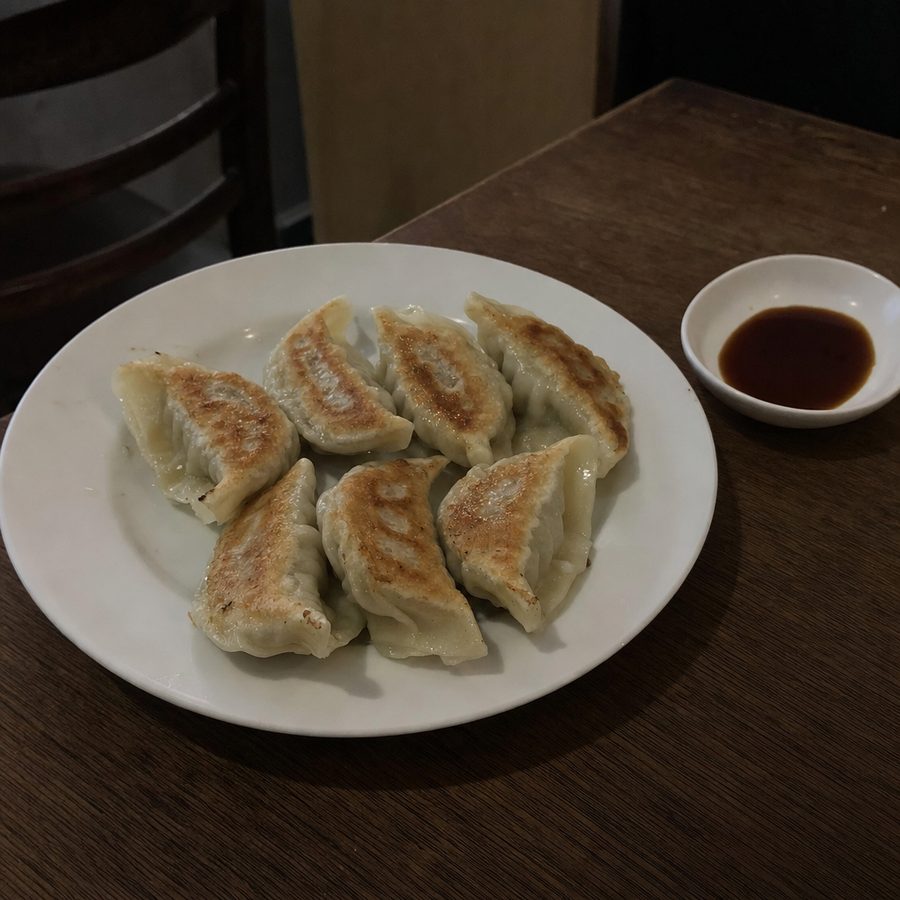
Because retries are included rather than metered, the workflow stops being a budgeting exercise. You brighten, then decide the background is still busy, then clean it, then adjust the crop, without watching a credit counter. That is the practical difference between FoodPhoto.ai and MenuCapture for a restaurant mid-refresh. You can see the kind of output that comes out of that loop below.
What MenuCapture's edit looks like
Before
After
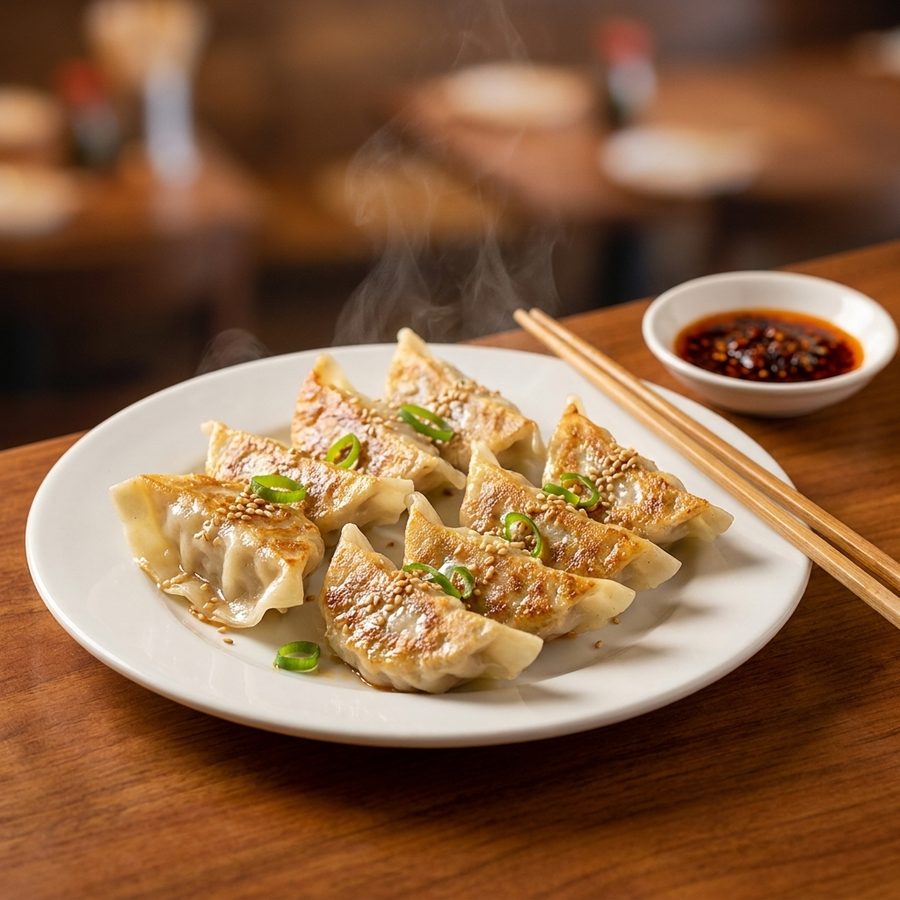
A dim phone photo of pan-fried dumplings, brightened and restyled with a text prompt while the dumplings stay exactly as served. Actual MenuCapture output: the original phone photo and the MenuCapture edit. This demo shows our tool, not the competitor's.
If you want to compare the whole workflow side by side, MenuCapture runs on prompts and flat pricing, and the full breakdown lives on the pricing page.
FoodPhoto.ai vs MenuCapture: the comparison
Published FoodPhoto.ai figures are as of July 2026. FoodPhoto.ai previously listed annual plans; the numbers below reflect its current monthly pricing.
| Dimension | FoodPhoto.ai | MenuCapture |
|---|---|---|
| Pricing model | Credit packs plus monthly subscriptions | Flat $9 per week or $159 per year |
| Entry price | $10 one-time Menu Test Pack (10 photos) | $9 for one week |
| 1,500-photo tier | Studio, $120 per month | Up to 1,500 edits per month included |
| Cost of a retry | 1 credit each | Included in your plan |
| Monthly output | Capped by tier credits (50 to 1,500) | Up to 1,500 edits per month |
| Editing method | Preset library (100+ food presets) | Plain text prompts on your photo |
| Speed | About a minute per photo | About 30 seconds per edit |
| Export formats | Multi-platform crops bundled per credit | Download and use on any channel |
| Food focus | Food-specific presets | Food-only, prompt-based |
| Commercial rights | Included on paid tiers | Your files, every channel |
No propaganda checkmarks in that table: FoodPhoto.ai's bundled export crops are a real convenience MenuCapture does not package the same way, and its $10 entry is genuinely lower than a week of MenuCapture for a one-time test.
Stick with FoodPhoto.ai if, switch to MenuCapture if
Stick with FoodPhoto.ai if you want the lowest possible one-time cost to test AI editing, you prefer choosing a preset over writing a prompt, and your monthly photo volume is steady enough to sit comfortably inside one tier. If you mostly need one clean image exported to several platform sizes at once, its bundled crops are a fair reason to stay.
Switch to MenuCapture if you are refreshing a real menu and will retry dishes until each one passes, if you would rather type the exact fix a rejected photo needs than hunt for the right preset, or if your work is bursty and a flat $9 per week matches a short project better than a monthly credit tier. The FoodPhoto.ai vs MenuCapture choice really comes down to metered retries against included ones.
There is no lock-in either way, which makes the decision low-stakes. Both tools work from the same input, a phone photo of your real dish, so trying one does not commit you to it. If FoodPhoto.ai's $10 pack tells you AI editing fits your food but the credit math does not fit your workflow, moving to a flat weekly plan is a matter of uploading the same photos and typing instead of picking. Choose the pricing shape that matches how your menu work actually arrives.
For a wider view of the category, see the AI menu photo tools roundup, and for the fundamentals of shooting a source photo either tool can work from, the food photography guide covers light, framing, and prep.