FoodGlow AI Alternative: MenuCapture vs FoodGlow for Restaurant Menus
An honest FoodGlow AI alternative comparison. FoodGlow sells one-time lifetime plans from $27 (promo pricing, July 2026); MenuCapture is $9 per week for up to 1,500 prompt-based edits of your real photos. The lifetime-deal math, weighed fairly.
MenuCapture builds this page, and we make a competing menu-photo tool, so read it with that in mind. FoodGlow (foodglow.ai) is an AI food-photo enhancer with an unusual pricing model for this category: one-time lifetime plans instead of a subscription. Like MenuCapture, it is an enhancer rather than a generator, so the two tools are close cousins. This is an honest read on when FoodGlow's lifetime deal is the right call and when it is not, using what each claims and costs as of July 2026. If you are weighing a FoodGlow AI alternative, the real question is not which is cheaper on paper but which shape of pricing fits how a menu project actually runs.
The comparison is not really tool against tool, since both are enhancers that start from your real photo. It is one pricing philosophy against another: a single upfront bet on a lifetime license versus a small recurring charge you pay only while you work. Each is honest, and each is right for a different kind of buyer. The rest of this page is about which bet fits how your menu actually changes, and about reading the lifetime-deal claims with clear eyes.
Who FoodGlow is genuinely good for
FoodGlow has real appeal for a specific buyer, and it is worth stating plainly.
- The lowest upfront number here. FoodGlow sells one-time lifetime licenses, not subscriptions: as of July 2026 its pricing page lists Essential at $27, Plus at $34, and Teams at $67. If its advertised claims hold up, a one-time $27 can cost less over time than any recurring plan, and that is a genuine draw for a budget-conscious owner.
- The enhancer approach, which keeps you compliant. FoodGlow transforms existing food photos with studio-style lighting, background removal and replacement, and professional-grade editing. Like MenuCapture, it improves a photo of your actual dish rather than inventing food, which is the approach that keeps you inside delivery-platform photo rules.
- A stated safety net. All plans list a 30-day money-back guarantee, with payment handled through Paddle. That lowers the risk of trying it, even though there is no free trial or free tier.
- A feature list aimed at menus. Based on its own product pages, FoodGlow advertises 50+ food scenes and backgrounds, 4K photo upscaling and output up to 4K, 1-click background removal, output aspect ratios of 1:1, 4:5, and 16:9, and unlimited generations on every tier plus commercial usage rights and lifetime updates. These are the vendor's claims from its pricing page, not independently tested results. In particular, whether "unlimited" carries throttles is not stated anywhere on the site.
Where the lifetime-deal economics break down for menus
A $27 lifetime license is genuinely cheap if it delivers. The category has a catch, though: a one-time payment only stays a bargain while the product stays alive and maintained. Before buying, it is worth asking three questions, and each one is also where the fit can break down for a real menu.
- Are the anchor prices real? Every FoodGlow tier is presented as a markdown from a much higher anchor: Essential from $99, Plus from $147, Teams from $334. Whether those were ever the actual selling prices is not verifiable from the site, and permanent "discounts" are common in lifetime-deal marketing. Treat the figures as promo pricing that can change.
- Does "unlimited" mean unlimited? A vendor funding unlimited AI processing from a one-time $27 payment has to limit costs somewhere. The site does not say how, so the throttling question stays open. That matters for a heavy menu refresh, where you may lean on the tool hardest.
- Do preset scenes fit your food? Scene-and-background tools work best when your dish suits one of the presets. The specific change a platform reviewer flagged, too dark, wrong crop, cluttered background, may not map onto a preset at all. With 50+ scenes to choose from, the odds are decent, but "choose a scene" is a different job from "fix this one flaw."
None of this means FoodGlow is a bad tool. It means the comparison is between a cheap upfront bet on vendor claims and a small recurring price for a known workflow. That is the honest frame for a FoodGlow vs MenuCapture decision.
There is one more angle to the economics that lifetime marketing tends to skip: a one-time payment is only cheap per use if you actually keep using the tool. Restaurants edit photos in bursts, a menu launch, a seasonal change, a batch of delivery listings, and then go quiet for months. A lifetime license sits idle during the quiet stretches, which is fine because it cost nothing extra, but it also means the "unlimited" headline is doing less work than it sounds, since your real usage is spiky and finite. A recurring plan you can start and stop matches that rhythm differently: you pay $9 in the weeks you edit and nothing in the weeks you do not. Whether that is better than a fixed $27 depends entirely on how often your menu changes and how much you trust the license to stay maintained through those years.
What changes when you use MenuCapture instead
MenuCapture does one thing: it edits the real photos you upload, including an ordinary phone snap taken in normal light, using plain text prompts. Type "brighten this and put it on a clean white background" and you get your dish back, improved, in about 30 seconds. You describe the exact change you need, which is the difference that matters when a delivery platform rejects a photo for one specific reason a preset scene cannot target.
The pricing shape is the other half of the story. MenuCapture is $9 per week (or $159 per year) with up to 1,500 edits per month, cancel anytime. You retry as often as you want and stop paying when the menu is done, which suits the way menu work comes in bursts rather than as a steady trickle. Every output starts from your photo, so what customers see is what they get, which keeps you inside DoorDash and Uber Eats rules, and the files are yours on delivery apps, Google, Instagram, your website, and print. The example below is MenuCapture's own output.
What MenuCapture's edit looks like
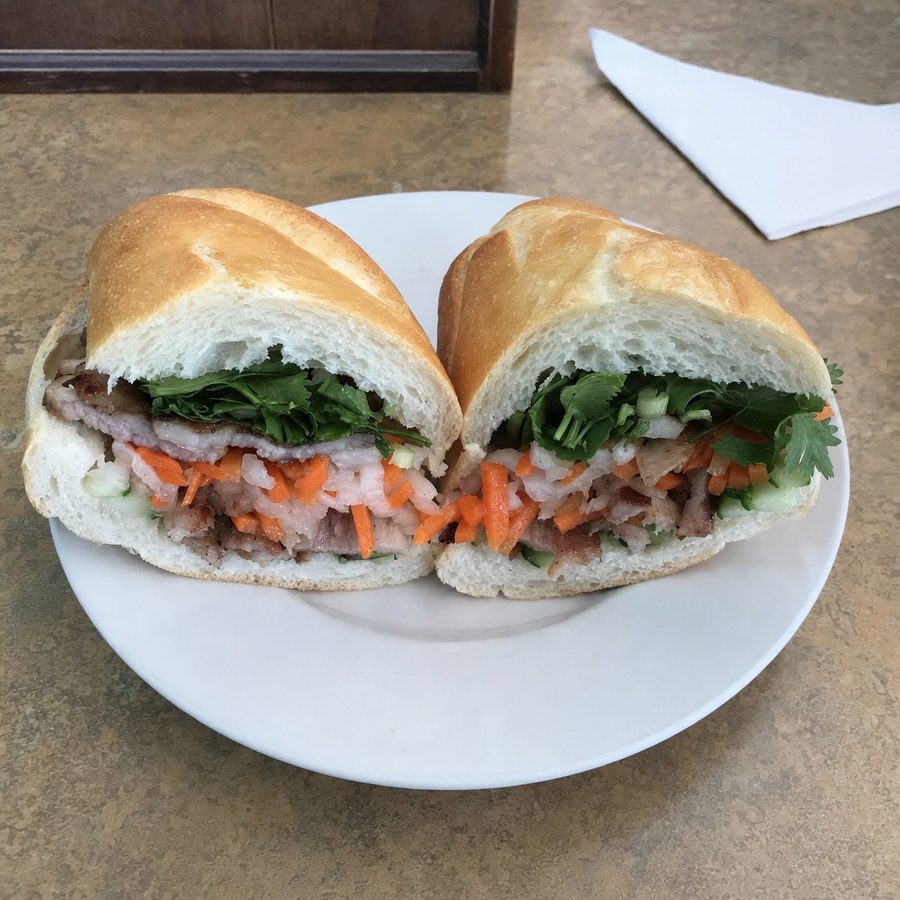
Before
After
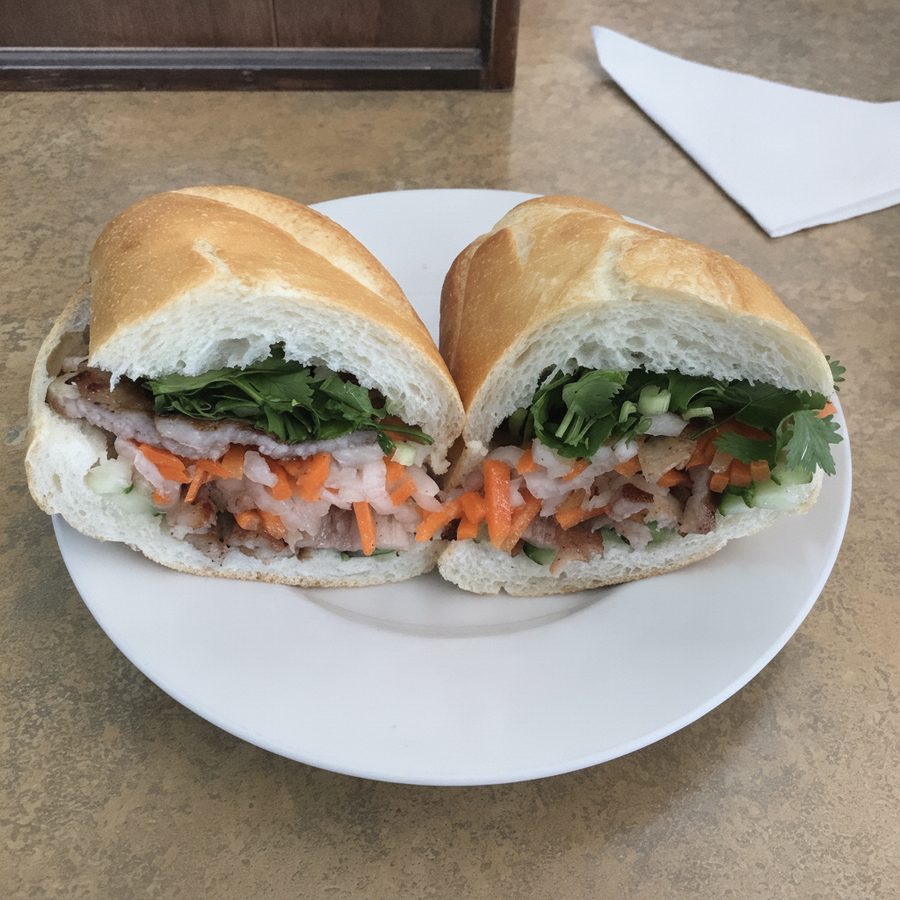
A washed-out phone photo of a banh mi, balanced and evened with a text prompt while the sandwich itself stays exactly as served. Actual MenuCapture output: the original phone photo and the MenuCapture edit. This demo shows our tool, not the competitor's.
If you want to see the recurring plan in full, MenuCapture is prompt-based and priced by the week, and the details are on the pricing page.
FoodGlow vs MenuCapture: the comparison
Say you want all 50 dishes done, with three attempts each to get them right. That is 150 images. FoodGlow figures are the vendor's claims and promo pricing as of July 2026.
| Dimension | FoodGlow | MenuCapture |
|---|---|---|
| Pricing model | One-time lifetime license (promo, July 2026) | Flat $9 per week or $159 per year |
| Entry price | $27 to $67 one time, from higher anchor prices | $9 for one week |
| Ongoing cost | None, if the product stays maintained | Only for the weeks you use it |
| Editing method | Preset scenes and backgrounds (50+) | Plain text prompts on your photo |
| Retries | Advertised as unlimited (vendor claim, throttling not stated) | Included, up to 1,500 per month |
| Enhancer or generator | Enhancer of your real photo | Enhancer of your real photo |
| Resolution | Up to 4K, per vendor claims | Menu-ready output |
| Guarantee | 30-day money-back, via Paddle | Cancel anytime; pay only while editing |
| Delivery-platform fit | Compliant, edits the real dish | Compliant, edits the real dish |
| Team seats | Up to 5 on Teams ($67) | Not sold per seat |
The unverified rows stay hedged on purpose: FoodGlow's "unlimited" and 4K claims are the vendor's, and its 30-day guarantee is a real, stated protection, so the table does not pretend the lifetime deal is a trap. Read the table as two honest offers rather than a scoreboard. If the vendor claims hold and your dishes suit the preset scenes, the lifetime column can genuinely win on total cost. If your edits are specific, one-off fixes and your usage is spiky, the flat weekly column tends to fit better. The row that should decide it for you is the editing-method one, presets against prompts, because that is the difference you will feel on every single photo, not just at checkout.
Stick with FoodGlow if, switch to MenuCapture if
Stick with FoodGlow if you want the lowest possible upfront number, your dishes suit its preset scenes, and you prefer a one-time payment over any subscription. Its lifetime deal is worth a look, protected by the stated 30-day money-back guarantee, and if the vendor claims hold and the product stays maintained, the economics can genuinely beat a recurring plan.
Switch to MenuCapture if you want to type the exact fix a rejected photo needs and iterate until it passes, if you would rather not bet on unverifiable "unlimited" claims and lifetime maintenance, or if paying only during the weeks you actually edit fits your menu cadence better. The FoodGlow AI alternative that suits a burst-driven menu project is a recurring, prompt-based editor. For a wider look at the category, see the AI menu photo tools roundup, and the food photography guide covers shooting a source photo worth editing.