Flair.ai Alternative: MenuCapture vs Flair.ai for Restaurant Menus
An honest Flair.ai alternative comparison. Flair.ai is a polished design tool for AI product scenes, strongest in fashion and beauty; for real dish photos that stay platform-compliant, MenuCapture is $9 per week. July 2026 pricing.
MenuCapture builds this page, and we make a competing menu-photo tool, so factor that in. Flair.ai is one of the more polished AI product-photography tools, with a real design-canvas workflow and a customer base in fashion and beauty. Food is on its list of use cases, but it is not the specialty. This is an honest look at when Flair.ai is the right call and when a restaurant is better served elsewhere, using its published pricing and features as of July 2026. If you are searching for a Flair.ai alternative because you want to fix a real dish photo rather than art-direct a new scene, that distinction is the whole story.
The comparison turns on one word: generate versus correct. Flair generates new scenes around a product, which is a creative superpower when you want art direction and a mismatch when you already have the photo and just want it fixed. Most menu work is the second kind. So the question is not whether Flair is good, it plainly is, but whether your job is scene-building or photo-fixing. Answer that and the right tool is obvious.
Who Flair.ai is genuinely good for
Flair.ai is one of the more capable tools in the category, and its strengths are specific and real.
- Brands that want a design canvas, not a one-shot generator. Instead of a single button, Flair gives you a canvas: place your product, stage props, describe the scene, and iterate. Creatively, it is one of the most controllable tools around, and that control is a real reason to choose it.
- Teams that need a consistent brand look. Paid tiers let you train custom models so outputs match your brand across campaigns. For a company running ongoing creative, that consistency is genuinely valuable.
- Anyone who needs short video too. Plans include short AI video generations, which are useful for social ads and something a photo editor does not do at all.
- Evaluators who want a real free tier. As of July 2026 there is a genuine $0 plan (1 custom model, 5 images, 1 video), with paid plans from $8 per month and a commercial license starting on Pro+ at around $26 per month. That is a fair way to try it before paying.
If you are a brand building a look, a beauty or apparel seller, or an agency producing campaign creative, that is a genuinely strong toolkit and Flair deserves the shortlist. The free tier lets you test it honestly, and the design canvas gives you control most one-shot generators cannot match. The trouble only starts when the job is a restaurant menu, which asks for the opposite of what Flair is built to do best.
Where Flair.ai breaks down for restaurant menus
The pivot is about fit and about compliance, not about polish. Flair is excellent at a job most restaurants do not actually have.
- Its DNA is fashion, not food. Flair's showcase work is beauty, jewelry, apparel, and furniture. The templates, virtual models, and scene library lean that way. Food is supported, not specialized, so a restaurant is using a general tool at the edge of its focus.
- Generation, not correction. Flair composes new scenes around a product. The typical restaurant problem is the reverse: the dish photo already exists and just looks dim, yellow, or cluttered. Scene generation is a detour for that job, and it introduces the risk below.
- Image caps meet menu volume. Plans meter generated images per month, 80 on Pro+ and 150 on Scale as of July 2026. Iterating across a 50-dish menu, several attempts per dish, eats those allowances quickly. MenuCapture includes up to 1,500 edits per month instead.
- Compliance risk on delivery listings. The more a generated scene departs from the plate you actually serve, the harder it collides with delivery-platform rules that require photos of the real item. An edit of a genuine photo stays on the safe side; a generated scene may not.
The pattern across those four points is the same: a restaurant menu is mostly correction work, and Flair is mostly a generation tool. A dim photo of a real burger does not need a new scene invented around it; it needs the exposure lifted, the background calmed, and the crop tightened, while the burger stays exactly the burger. Ask a scene generator to do that narrow repair and you are using a campaign tool for a maintenance task, paying in monthly image caps and compliance risk for creative flexibility a menu photo does not want.
What changes when you use MenuCapture instead
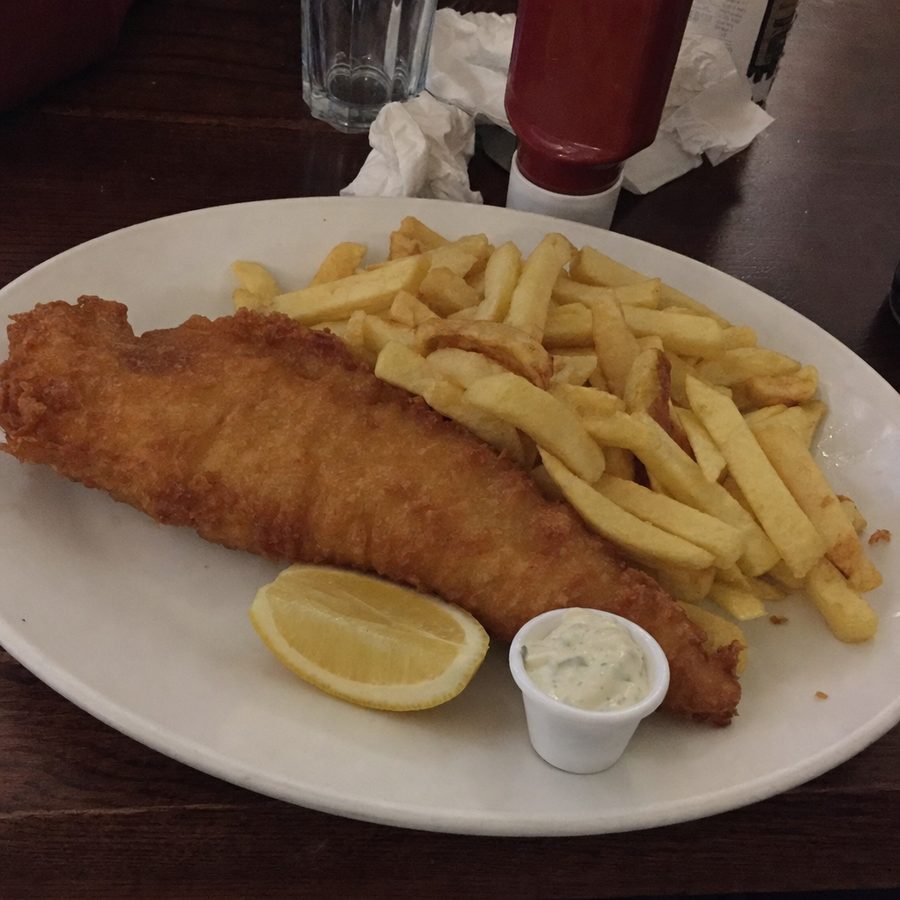
The switch is a change of premise. MenuCapture starts from your photo, always. You upload the real dish, a phone photo is fine, type the change you want, and get the edit back in about 30 seconds. There is no canvas to stage and no scene to compose, because the scene already exists: it is the plate you served. The whole job is describing a fix and approving the result, which is exactly what a menu photo needs and nothing more. The food in the photo is the food you serve, so there is no compliance gamble. Pricing is flat and restaurant-sized, $9 per week or $159 per year with up to 1,500 edits per month, so you are not rationing images during a menu overhaul. And the edited photos are yours on DoorDash, Uber Eats, Google, Instagram, your website, and print, with no per-channel fine print. The example below is MenuCapture's own output from that loop.
What MenuCapture's edit looks like
Before
After
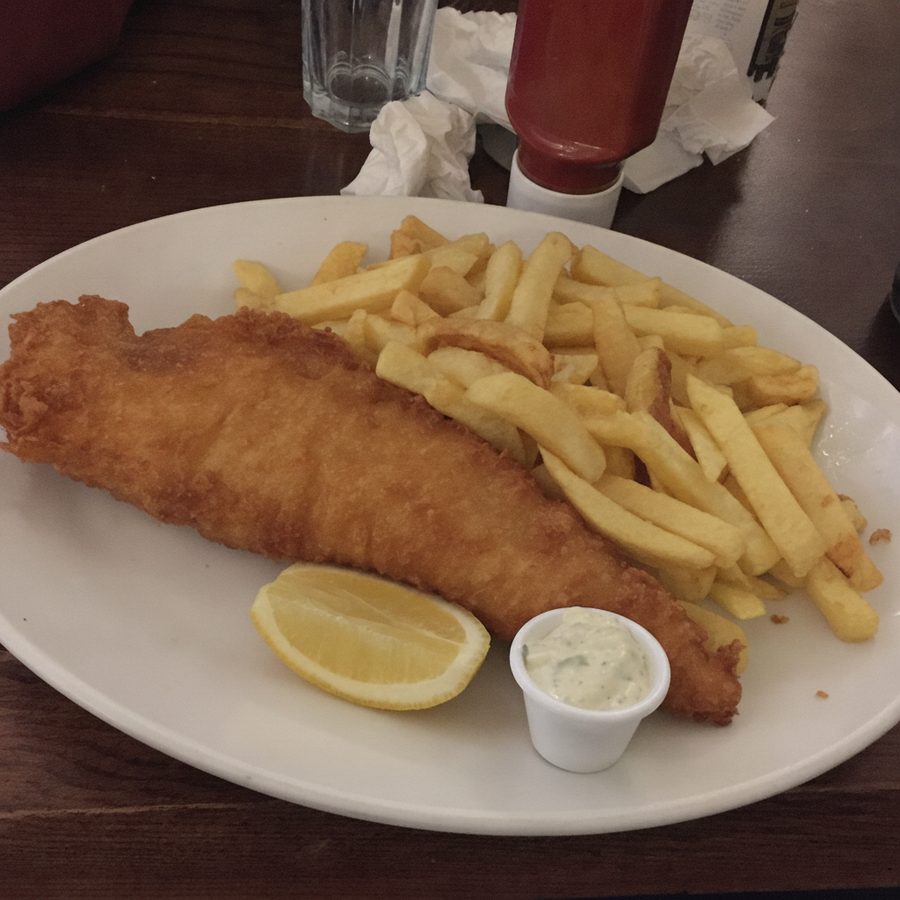
A dim pub photo of fish and chips, brightened with the busy table softened, while the plate itself stays exactly as served. Actual MenuCapture output: the original phone photo and the MenuCapture edit. This demo shows our tool, not the competitor's.
That is the Flair.ai vs MenuCapture difference in practice: MenuCapture corrects a real photo instead of generating a scene, and the pricing page shows the flat plan.
The image-cap math on a menu refresh
Numbers make the fit gap concrete. As of July 2026, Flair's Pro+ tier includes 80 generated images a month and Scale includes 150. Now picture a real refresh of a 50-dish menu, where a handful of dishes take three or four attempts to get the lighting and crop right. It is easy to need well over a hundred renders in a single push, and on Pro+ you would run out before you finished, on Scale you would be watching the counter by the end. Those caps are sized for a brand producing a steady stream of campaign images, not for a restaurant emptying a whole menu through the tool in one week.
MenuCapture is sized the other way. Up to 1,500 edits a month means a full-menu refresh, retries included, sits comfortably inside a single flat plan, and the plan is $9 for the week you actually do the work. The point is not that more is always better; it is that a burst-shaped job and a monthly image cap pull against each other, and menu refreshes are bursts. When the tool's limit and the work's rhythm disagree, the limit wins, and you feel it as rationed attempts.
Flair.ai vs MenuCapture: the comparison
Flair.ai figures are as published as of July 2026; exact prices vary with monthly versus yearly billing.
| Dimension | Flair.ai | MenuCapture |
|---|---|---|
| Core job | Generate branded product scenes | Edit your real dish photos |
| Strongest verticals | Fashion, beauty, jewelry, furniture | Restaurant food only |
| Workflow | Design canvas, compose a scene | Upload a photo, type a prompt |
| Pricing | Free tier; Pro from $8/mo, Pro+ from $26/mo, Scale from $38/mo | $9 per week or $159 per year |
| Free entry | Free plan: 1 model, 5 images, 1 video | $9 for one week |
| Monthly image limits | 80 on Pro+, 150 on Scale | Up to 1,500 edits per month |
| Commercial license | From Pro+, around $26/mo | Included; files are yours |
| Video | Short AI video generation | Photos only |
| Editing vs generation | Composes new scenes | Corrects your real photo |
| Delivery-platform fit | Risk if the scene departs from the real dish | Compliant, edits the real dish |
Flair's free tier, video generation, and creative control are real strengths MenuCapture does not match; the table is not stacked with fake checkmarks.
Stick with Flair.ai if, switch to MenuCapture if
Stick with Flair.ai if you sell products and want art-directed campaign imagery, if you value a design canvas and custom brand models, or if short AI video is part of what you need. For that brief, Flair is one of the best tools in the category, and MenuCapture is not trying to be.
Switch to MenuCapture if you run a restaurant and the photos on your menu need to look right and stay honest, if your dish photos already exist and just need fixing, or if metered image caps get in the way of a real menu refresh. The Flair.ai alternative that fits a restaurant is a correction tool, not a generator, and the tell is simple: if you keep wanting to keep the photo you have and just make it better, you want an editor. There is no lock-in in trying one, since both work from the same phone photo, so let the shape of your job, scene-building or photo-fixing, make the call.
For the rest of the field, see the AI menu photo tools roundup, and for shooting a source photo worth editing, the food photography guide covers the basics.