FoodShot AI Alternative: MenuCapture vs FoodShot AI for Restaurant Menus
An honest FoodShot AI vs MenuCapture comparison: where FoodShot AI's style library and mobile apps are the right call, and where its credit pricing stops fitting a real menu project.
We build MenuCapture, so treat this as a comparison written by an interested party. That is exactly why we want it to be honest: FoodShot AI is a real, capable app, and for some restaurants it is the better pick. This page lays out where FoodShot AI genuinely wins, where it stops fitting a menu project, and how to tell which side of that line you are on before you pay anyone.
Who FoodShot AI is genuinely good for
FoodShot AI (foodshot.ai) turns dish photos into styled food photography, and it does several things MenuCapture does not. These are real strengths, not throat-clearing before the pitch.
- Native mobile apps. iOS and Android apps rated 4.7 stars, plus a web studio. If your whole workflow lives on a phone at the pass, shooting and editing in the same app is a genuine convenience that a browser tool does not match.
- A large style library. Over 200 preset styles spanning delivery, menu, and fine dining looks, plus a builder mode for combining backgrounds and plate styles. If you want a designed aesthetic fast and do not want to describe it in words, presets are the shorter path.
- Marketing extras. A poster mode with design templates and 4K output for print. If you are making a promo poster or a large-format piece, having those templates in the same tool saves a trip to a separate design app.
- Commercial license on every paid plan. You can use the output commercially from the first paid tier, which is one less thing to check.
If you are a single-location owner who wants to shoot a few signature plates on your phone, drop them into a fine-dining style, and post them, FoodShot AI is a reasonable, well-built choice. We would not talk you out of it for that job.
Where FoodShot AI breaks down for a full restaurant menu
The trouble is not quality. It is the shape of the pricing against the shape of menu work.
- Credits meter your retries. Real menu editing is iterative. You try a background, it is not quite right, you try again, you nudge the crop. On FoodShot AI every generation spends a credit, and the Starter plan (as of July 2026) is 25 credits a month. That is less than one attempt per dish for a typical menu, so the second and third tries you actually need come at a cost, and you start settling for the good-enough result instead of the right one.
- Style-first can drift from your real plate. FoodShot AI leans on applying preset styles to your dish. That produces polished images quickly, but the further the output moves from your actual plating, the more risk you carry on DoorDash and Uber Eats, which require the photo to show the dish a customer will receive. A designed look is great for a promo poster and riskier for a delivery listing.
- Monthly caps do not match how menus get edited. Restaurants edit in bursts: an entire menu this week, then nothing for two months, then a seasonal refresh. A monthly credit drip of 25, 100, or 250 images is the wrong container for that rhythm. You either overbuy a big plan you use once, or you ration a small one.
None of this makes FoodShot AI a bad app. It makes it a style tool priced for occasional, per-image use, which is a different job from re-photographing a live menu.
What changes when you edit your real photos with MenuCapture
MenuCapture does one narrow thing: it edits the real photo you upload, including an ordinary phone snap taken in dim restaurant light, using plain text prompts. You type "brighten this and put it on a clean white background," and you get your dish back, improved, in about 30 seconds. There is no style library to browse and no credit meter ticking down while you experiment.
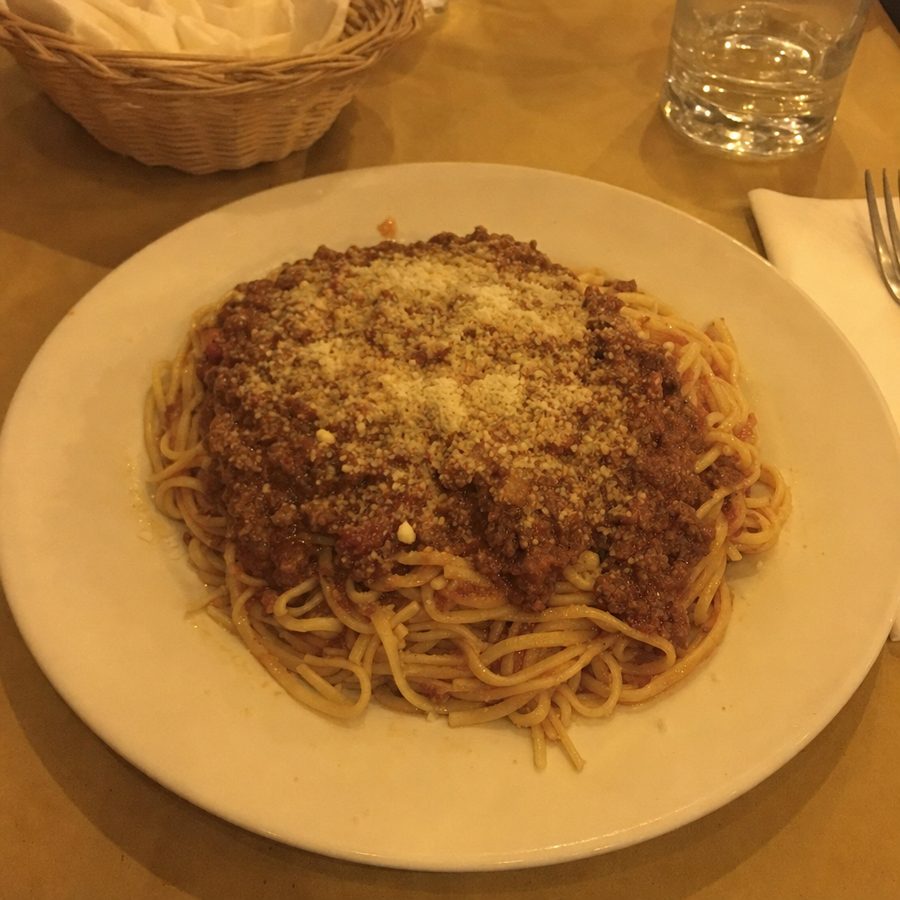
Here is one of those edits. The plate, the sauce, and the parmesan are the same food on the same table. Only the lighting and background changed, which is the part a delivery reviewer cares about.
What MenuCapture's edit looks like
Before
After
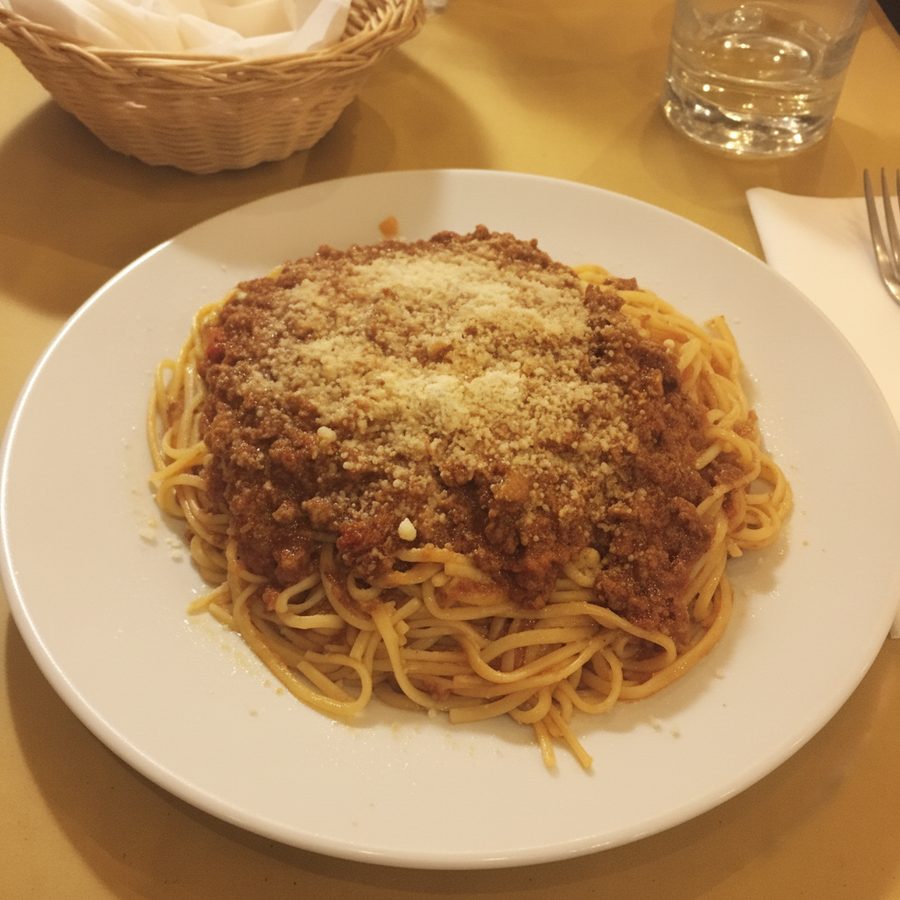
A dim-lit bolognese, relit and cleaned up in about 30 seconds with a single text prompt, from the same phone photo you would take at the pass. Actual MenuCapture output: the original phone photo and the MenuCapture edit. This demo shows our tool, not the competitor's.
Because the output starts from your real photo, what customers see is what they get, which keeps you inside delivery-platform photo rules. And because the plan is flat, retrying is free: you can run the same dish five times to nail it and it costs the same as running it once.
- $9 per week (or $159 per year) with up to 1,500 edits per month. Retry as often as you want.
- Prompt-level control instead of picking the nearest preset. If the only problem is a stray napkin, you say "remove the napkin, keep everything else."
- Yours on every platform. Download and use the photos on delivery apps, Google, Instagram, your website, and print, with no per-platform restrictions.
MenuCapture vs FoodShot AI, side by side
Accurate for both tools as of July 2026. No propaganda checkmarks; where FoodShot AI leads, it says so.
| What matters | FoodShot AI | MenuCapture |
|---|---|---|
| Pricing model | Per-image credits | Flat time-based plan |
| Entry price | $15/mo ($9/mo yearly), 25 credits | $9 per week or $159 per year |
| Editing volume | 25 to 250 credits/month by tier | Up to 1,500 edits per month |
| Cost of a retry | Spends another credit | Included |
| How you direct it | 200+ preset styles + builder | Plain text prompts |
| Approx. per-image cost | About $0.60 on Starter | Under a cent at full monthly use |
| Speed | Fast preset apply | About 30 seconds per edit |
| Source fidelity | Style-first, can drift from the plate | Edits your real photo only |
| Mobile apps | iOS and Android, 4.7 stars | Browser-based |
| Print and posters | Poster templates, 4K output | Not a design tool |
| Usage rights | Commercial license on paid plans | Yours on every platform |
What a 50-dish menu really costs on each
Abstract pricing is easy to wave away, so put a real project through both tools. Say you want all 50 dishes done, and you allow 3 attempts per dish to get each one right, because the first render rarely lands. That is 150 images.
On FoodShot AI, 150 generations is past the Business plan's 100 credits (as of July 2026), so you are on the $99 Scale plan for its 250 credits, and that is for one pass. If a few dishes need a fourth or fifth try, or you decide the whole menu needs a different background next season, you are back into the credit budget again. The credit model is fine for a trickle of images and works against you the moment a project has real iteration in it.
On MenuCapture, the same 150 edits sit comfortably inside a single $9 week, because the plan covers up to 1,500 edits per month. Run a dish ten times if you want. Redo the background for the whole menu in the same week. The number on the invoice does not move.
The point is not that FoodShot AI is expensive in general. It is that a per-credit tool and a batch menu project pull in opposite directions, while a flat plan is built for exactly the retry-heavy work a menu needs.
Stick with FoodShot AI or switch to MenuCapture?
Stick with FoodShot AI if you want a phone-first app, you lean on preset styles rather than describing edits, you make posters or 4K print pieces in the same tool, and you only touch a handful of photos at a time. For that owner, the credit model is fine and the mobile apps are a real plus. Go use it.
Switch to MenuCapture if you are redoing a whole menu, you iterate until each dish is right, you refresh photos every season, and you want the edited plate to stay faithful to the food you actually serve. On that work, a flat $9 per week beats watching a credit balance, and prompt editing gives you the precise control a preset cannot.
If you are still weighing tools, our AI menu photo tools roundup puts the whole category next to each other, and MenuCapture's pricing lays out the weekly and yearly plans in full. When you are ready, you can start from the MenuCapture home page with a photo already on your phone.