GourmetPix Alternative: MenuCapture vs GourmetPix for Restaurant Menus
An honest GourmetPix vs MenuCapture comparison: when pay-once credits that never expire are the smarter buy, and when a flat weekly plan wins for a full menu.
MenuCapture is our product, so read this as a comparison from a competitor, written to be fair. GourmetPix takes a pricing angle we genuinely respect: no subscription at all, just credits you buy once and spend whenever, and they never expire. For light use that is hard to beat. Whether it is the right call for a restaurant redoing a whole menu is a different question, and this page works through both sides so you can pick the tool that actually fits your job.
Who GourmetPix is genuinely good for
From its published pages (gourmetpix.com), these are real advantages, and a couple of them are things MenuCapture does not offer at all.
- No subscription, ever. Pay-as-you-go credit packs and nothing recurring. "No subscriptions, no hidden fees" is the pitch, and the pricing page backs it up. If a monthly charge is a dealbreaker for you, that alone can settle it.
- Free credits to try it. 10 free credits at signup, no credit card required, enough for about 5 photos. You can judge the output before spending a cent.
- Credits never expire. Buy a pack, use it over a year if you like. For a restaurant that only shoots a few new dishes now and then, that patience is worth real money.
- A simple, predictable menu of operations. Generation costs 2 credits, refinement 2, upscale 3. You can add up a job in your head before you start.
If you need five or ten photos improved once, GourmetPix's free credits plus a single $9 pack is an honestly excellent deal, and this is the section where we say so plainly.
Where GourmetPix breaks down for a full restaurant menu
The credits-never-expire model is fair. The problem is what happens to the credit count when you edit at menu scale.
- Iteration is metered. The first output is rarely the final one. On GourmetPix every retry and every refinement spends credits, so a 50-dish menu with a few attempts per dish lands in the several-hundred-credit range before you have polished anything.
- Costs stack per operation. Generation, refinement, and upscale are billed separately. The advertised per-photo price (as low as $0.40 in the biggest pack) assumes 2 credits and no refinements. A photo you actually polish, refine once, and upscale runs 4 to 7 credits, so the real per-photo cost roughly doubles.
- Pack math punishes big and repeat jobs. A full menu pushes you into the $99 Grand Feast pack, and a second pass for a seasonal menu or new dishes means buying again. The never-expire benefit helps a trickle of edits, not a burst of them.
This is the honest tension: the model that makes GourmetPix great for a handful of photos is the same model that makes a whole menu expensive. The generosity is real, but it is generosity aimed at light, occasional use, and a full menu redo is neither light nor occasional.
What changes when you edit your real photos with MenuCapture
MenuCapture takes the opposite approach and prices by time, not by operation. Upload your real photo, type the change you want in plain words, and get the result in about 30 seconds. There is no generate-then-refine-then-upscale loop to budget for, because retries, refinements, and variations all count the same: included.
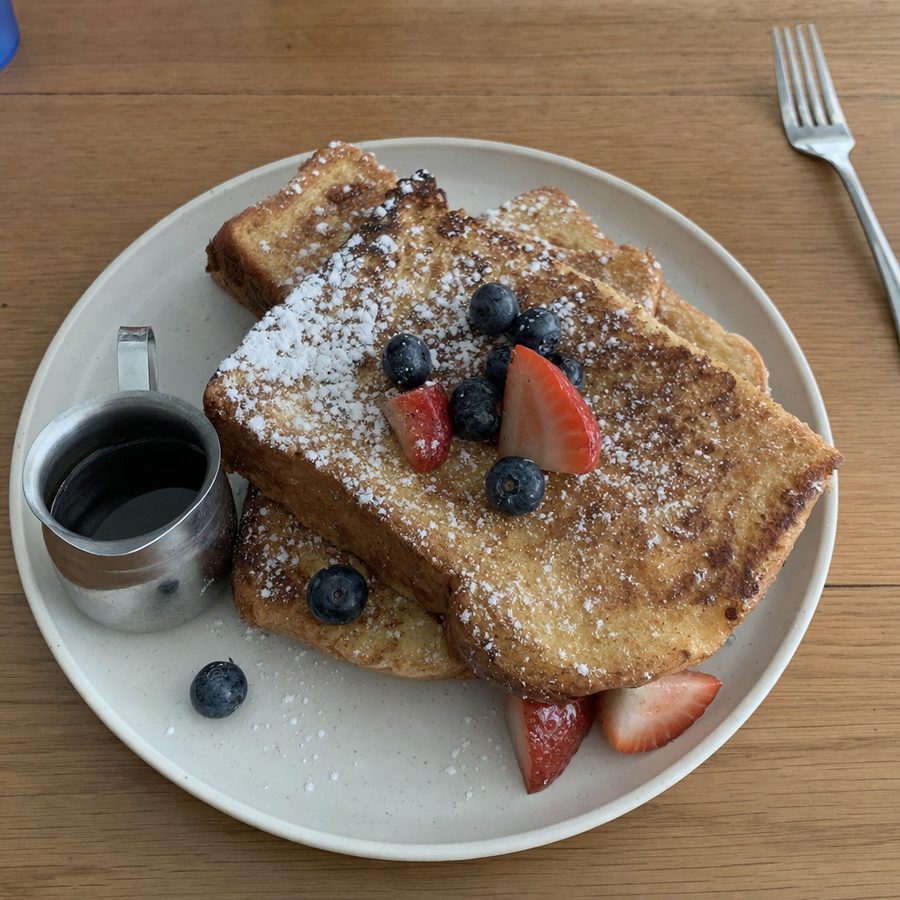
Below is one of those edits. The french toast, the powdered sugar, the berries, and the syrup jug are the same. Only the flat lighting and dull color changed.
What MenuCapture's edit looks like
Before
After
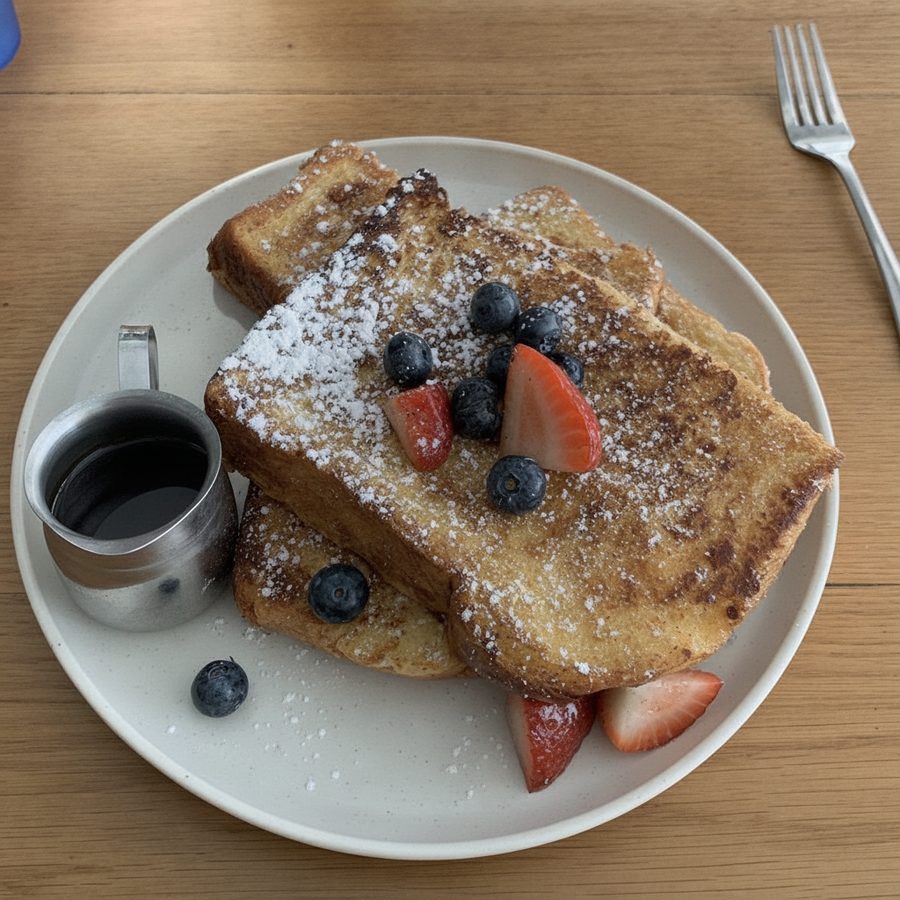
Flat brunch lighting brightened and color-corrected from a single phone photo, with no separate refine or upscale step to pay for. Actual MenuCapture output: the original phone photo and the MenuCapture edit. This demo shows our tool, not the competitor's.
- Flat price, heavy use. $9 per week or $159 per year, up to 1,500 edits per month. On a full menu that works out to well under a cent per edit at full use.
- One step, not three. Instead of paying for a generation, then a refinement, then an upscale, you make the change with one prompt and iterate freely.
- Your photo, everywhere. Outputs are edits of the dish you actually serve, safe for DoorDash and Uber Eats photo rules, and yours to publish on any platform.
MenuCapture vs GourmetPix, side by side
Accurate for both tools as of July 2026.
| What matters | GourmetPix | MenuCapture |
|---|---|---|
| Pricing model | Pay-once credit packs | Flat time-based plan |
| Recurring charge | None | Weekly or yearly (cancel anytime) |
| Free trial | 10 credits, about 5 photos | See pricing page |
| Cheapest paid entry | $9 for 20 credits | $9 for one week |
| Cost per generation | 2 credits | Included |
| Cost to refine | +2 credits | Included |
| Cost to upscale | +3 credits | Included |
| Real cost of a polished photo | Often 4 to 7 credits | Included |
| Credits expire? | Never | No credits used |
| How you direct it | Generate then refine | Plain text prompts, about 30 seconds |
| Source fidelity | Edits your real photo | Edits your real photo |
| Usage rights | Yours to use | Yours on every platform |
What a 50-dish menu costs in GourmetPix credits
The clearest way to see the model is to run a real project through it. Take a 50-dish menu where you allow a few attempts per dish, because the first render is rarely the keeper, and you polish and upscale the ones you keep.
Generation is 2 credits. If you average two generations per dish before one looks right, that is 4 credits per dish just to land a usable frame, or 200 credits across 50 dishes. Then the keepers get a refinement (2 credits) and an upscale (3 credits), adding another 5 credits each, so 50 finals add roughly 250 more credits. You are near 450 credits before any second thoughts, which means the $99 Grand Feast pack (500 credits) for one pass. A seasonal refresh or a batch of new dishes later means buying again. The credits-never-expire promise is real and kind, but it does not lower the count on a job this size.
On MenuCapture, that entire project, generations, retries, refinements, and all, fits inside a single $9 week, because there are no separate operations to bill and the plan covers up to 1,500 edits per month. This is not a knock on GourmetPix. It is the same tension every pay-per-operation tool has: the model that is generous for a few photos is the model that meters a whole menu.
Which one should you pick?
This one really does come down to volume and cadence, so here is the split without spin.
Pick GourmetPix if you need a small number of photos touched up once, you would rather never see a subscription, and you value credits that sit in your account until you use them. For that owner, the free credits and the $9 pack are the smarter buy, full stop.
Pick MenuCapture if you are redoing a menu, iterating until each dish looks right, or updating photos every season. A flat $9 per week beats watching a credit meter drop 2 credits at a time, and the prompt workflow skips the separate refine and upscale charges entirely.
There is a rough break-even worth knowing. As long as you only ever touch a small handful of photos and rarely come back, GourmetPix's pay-once packs keep you under what even a single MenuCapture week costs, and the never-expire credits mean nothing goes to waste while you wait. The moment your usage turns into a project, a menu, a rebrand, a seasonal rotation, the credit count climbs past a $9 week and keeps climbing every time you iterate. Neither is the "right" tool in the abstract. The honest test is whether your next few months look like a trickle of edits or a burst of them, and you know that answer better than we do.
For the wider field, see our AI menu photo tools roundup, and MenuCapture's pricing shows exactly what the weekly and yearly plans include. If you want to try an edit on a photo you already have, start from the MenuCapture home page.