“Brighten the overall exposure slightly while protecting highlights on the plate and keeping the food colors natural.”
Use: Lifts a mildly underexposed photo without bleaching pale food, glaze, or white dishes.
Fix a real dish photo with a plain text command, not a studio reshoot.
An AI food photo editing prompt is a plain text command that tells an editor what to change in a real dish photo you already took, and what to leave alone. For example: fix the yellow light and clean up the background. A prompt can adjust light, color, background, crop and small plating details.
Updated July 2026
Prompt editing starts with a real photo you already took. It does not generate a new dish. A clear text command tells an editor what visible presentation issue to correct and what parts of the source must remain unchanged. A prompt can adjust light, color, background, crop, and small plating details. It should not be used to add food that is not part of the serving, and it cannot recover detail the camera never captured or fix a fundamentally failed shot. Blur, blocked ingredients, an incorrect serving, or a missing component usually calls for a reshoot.
For a guided editing workflow, the AI food stylist explains source-photo cleanup, while the AI food photography guide covers where careful automation fits. MenuCapture's photo editing features are designed around existing restaurant images, so the strongest input remains a sharp, complete, honestly plated photo.
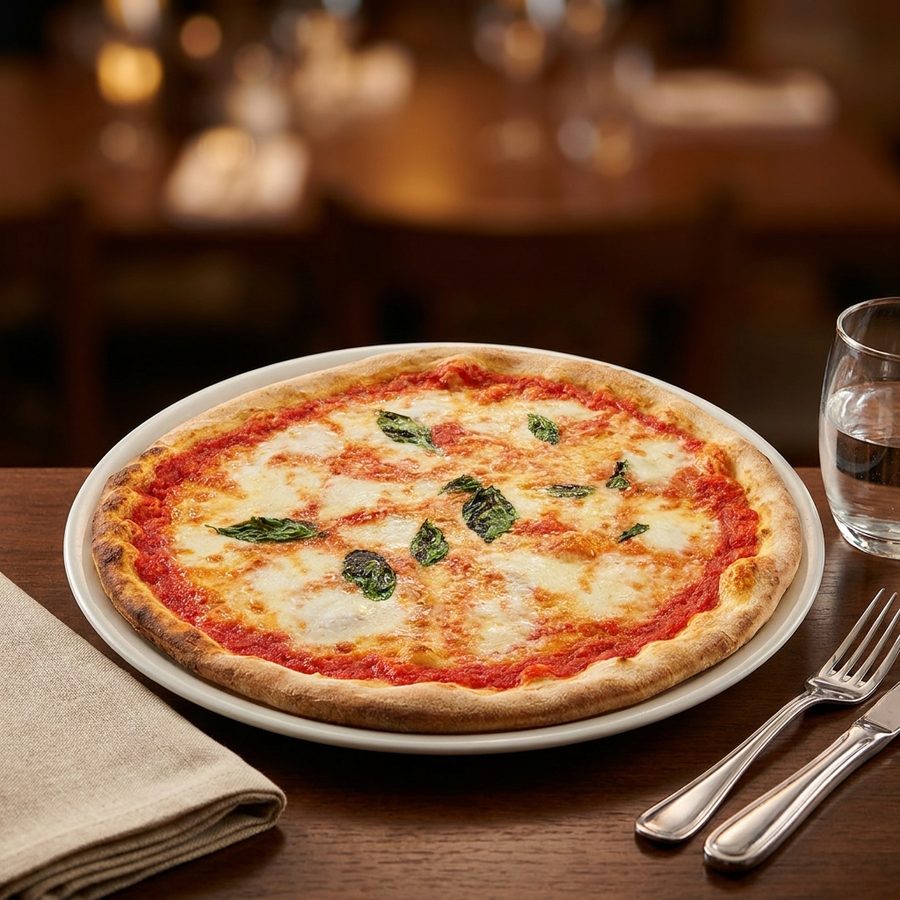
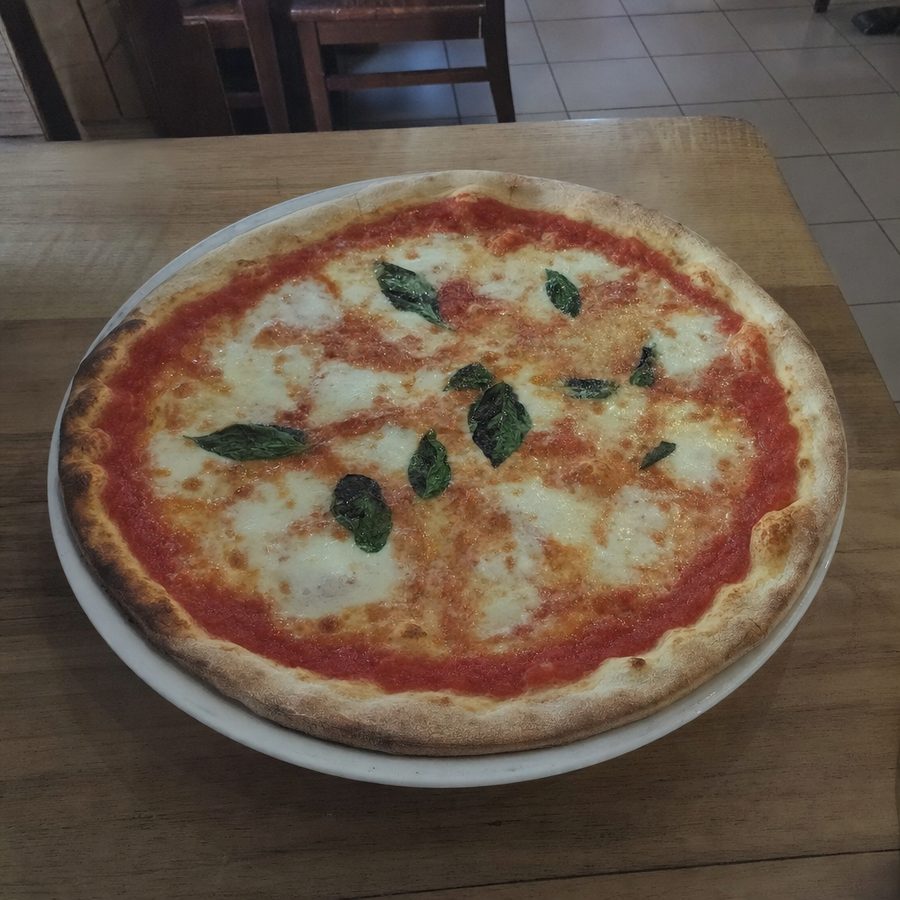
Use these commands when the dish is sharp and complete but the available light makes it look darker, flatter, warmer, or cooler than it appeared in person.
“Brighten the overall exposure slightly while protecting highlights on the plate and keeping the food colors natural.”
Use: Lifts a mildly underexposed photo without bleaching pale food, glaze, or white dishes.
“Correct the yellow indoor-light color cast and return the plate, sauce, and garnish to neutral, realistic colors.”
Use: Removes the warm cast common under tungsten bulbs while preserving the dish itself.
“Reduce the cool blue tint in this photo and restore a neutral white balance without warming the food too much.”
Use: Corrects shade or cool LED light when whites and pale sauces look blue.
“Soften the harsh shadow beside the dish while keeping gentle directional light and natural depth.”
Use: Balances one distracting hard shadow without flattening every contour on the plate.
“Recover detail in the bright plate and reflective sauce highlights without darkening the rest of the dish.”
Use: Controls small overexposed areas when the important food detail is still present in the source.
“Lift the dark side of the food slightly while preserving realistic contrast and the original direction of light.”
Use: Opens a blocked shadow on a burger, bowl, or plated entree without creating a second light source.
“Increase midtone contrast gently so the existing texture is easier to see, with no crunchy sharpening or oversaturation.”
Use: Clarifies real crust, crumb, grill marks, or layered ingredients in a slightly flat capture.
“Match the color balance to natural daylight and keep reds, greens, whites, and browns believable.”
Use: Provides a broad, restrained correction when mixed restaurant lighting has shifted several colors.
A background edit should isolate the real plate, preserve its edges and shadows, and replace only the surrounding surface or distractions.
“Remove the small clutter behind the plate and rebuild a clean, neutral background while leaving the dish unchanged.”
Use: Clears utensils, containers, or kitchen distractions that do not overlap the food.
“Clean crumbs and small stains from the table around the plate, preserving the real plate edge and natural shadow.”
Use: Tidies the surrounding table without erasing crumbs or texture that belong to the dish.
“Replace only the background surface with a clean matte white tabletop and retain the original dish, angle, and lighting.”
Use: Creates a simple catalog-style setting without changing the photographed serving.
“Replace only the table with a subtle light wood surface, keeping the plate boundary and contact shadow realistic.”
Use: Adds a quiet wood setting when a plain, warm surface suits the restaurant presentation.
“Replace only the surrounding surface with understated pale marble, with no added props or dramatic veins.”
Use: Provides a restrained marble base that does not compete with the food.
“Blur the existing distant background gently while keeping the entire dish, plate rim, and nearby table sharp.”
Use: Reduces a busy dining-room background when the subject already has clean edge separation.
“Remove the partial napkin and utensil at the frame edges, then fill those areas with the existing table texture.”
Use: Repairs edge distractions without altering anything served on the plate.
“Even out the background brightness and color while preserving the original surface texture and dish shadow.”
Use: Corrects a patchy tabletop or backdrop when replacement is unnecessary.
These small corrections tidy accidental service marks and reposition only what is visibly present, without adding ingredients or changing the portion.
“Remove the sauce smudge from the empty plate rim and leave the plated food and intentional sauce untouched.”
Use: Cleans one accidental rim mark while preserving the actual presentation.
“Straighten the existing crooked garnish slightly without changing its size, type, color, or position on the dish.”
Use: Refines a garnish that shifted between the pass and the photograph.
“Remove the single stray crumb from the clean area of the plate and preserve all crumbs that are part of the food.”
Use: Tidies an isolated plate mark without making breaded or crumb-topped food look artificial.
“Even out the existing sauce drizzle into a neat but natural line, using only the sauce already visible in the photo.”
Use: Corrects a small broken or uneven section without adding more sauce.
“Clean the small fingerprint from the plate rim while preserving the plate texture, reflections, and edge.”
Use: Fixes a handling mark on glossy serviceware.
“Tuck the existing loose herb leaf closer to the plated garnish without adding or removing any garnish.”
Use: Organizes one displaced leaf while keeping the served ingredients accurate.
“Neaten the edge of the existing puree swipe slightly while keeping its original amount, length, and handmade character.”
Use: Smooths a minor plating wobble without redesigning the plate.
“Remove the small accidental sauce drip on the outside of the bowl and keep the food inside exactly as photographed.”
Use: Cleans the serving vessel while leaving the portion untouched.
Temperature and freshness edits should be nearly invisible, supported by what the real dish looked like at service, and limited to cues that faded during capture.
“Add a faint wisp of natural steam directly above this genuinely hot dish, keeping it translucent and subtle.”
Use: Restores a temperature cue that the camera missed on soup, noodles, or a hot entree.
“Make the existing steam slightly easier to see without increasing its area or obscuring the food.”
Use: Clarifies steam already recorded against a low-contrast background.
“Add a very light natural sheen to the existing sauce, following the current highlights and surface shape.”
Use: Restores moist appearance when a real sauce photographed slightly matte.
“Restore a subtle just-served sheen on the visible meat surface without changing its color, doneness, or texture.”
Use: Corrects a dry-looking capture while keeping the cooked protein accurate.
“Refresh the visible herb garnish subtly by restoring its natural green color and gentle firmness, without adding leaves.”
Use: Helps real herbs that wilted slightly during the short photo setup.
“Reduce the dry-looking highlights on the existing pasta sauce and restore a light, realistic surface gloss.”
Use: Balances dull reflections without adding sauce or hiding noodle texture.
“Restore a slight fresh moisture cue to the existing cut fruit without changing its shape, amount, or ripeness.”
Use: Makes recently cut fruit read as it did when served, with no invented pieces.
Prepare a clean, readable crop for a listing, then check the destination rules because accepted ratios and content standards can differ by platform.
“Crop this photo to 16:9 with the complete dish centered, keeping comfortable space around every plate edge.”
Use: Creates a wide delivery-listing crop without cutting off included components.
“Crop this photo to a square with the complete dish centered and consistent margins around the plate.”
Use: Prepares a flexible 1:1 version for channels that use square thumbnails.
“Reframe the existing photo so the dish is centered and level, without changing the serving size or camera angle.”
Use: Corrects a mildly tilted or off-center composition using available frame area.
“Tighten the crop around the full plate while leaving a small, even margin and showing every included side.”
Use: Makes the dish larger at thumbnail size without implying a larger portion.
“Remove text, a visible logo, and promotional material from the background only, leaving the dish and packaging unchanged.”
Use: Clears background marketing elements when a platform requires an item-focused image.
“Remove the unrelated decorative props around the plate and replace them with the existing plain table surface.”
Use: Simplifies a styled source photo while preserving the entire menu item.
“Extend the existing plain background slightly to create even crop margins, without enlarging or altering the dish.”
Use: Adds safe crop room when the original frame is only a little too tight.
Category-level commands make a set feel consistent, but each edit should still respect the light, color, ingredients, and serving in every individual source photo.
“For this soup photo, neutralize the warm indoor cast, lift the broth detail slightly, and keep the bowl and ingredients unchanged.”
Use: Creates a balanced soup image while retaining the real broth color and contents.
“For this soup photo, soften the bowl-side shadow and add only a faint steam cue because the soup was served hot.”
Use: Shows heat and bowl form without covering visible toppings.
“For this soup photo, center the complete bowl in a square crop and keep every garnish and included side visible.”
Use: Standardizes soup thumbnails without modifying what comes with the order.
“For this soup photo, clean drips from the outside of the bowl and crumbs from the surrounding table only.”
Use: Tidies the vessel and setting while leaving the soup surface intact.
“For this dessert photo, correct the color balance, protect pale cream highlights, and preserve the real texture and portion.”
Use: Balances cake, pastry, or plated dessert tones without whitening or enlarging the serving.
“For this dessert photo, remove the stray plate-rim crumb and neaten only the existing sauce line.”
Use: Applies two restrained plating fixes while keeping all edible components present.
“For this dessert photo, lift the exposure slightly and retain natural chocolate browns without oversaturation.”
Use: Clarifies a dark dessert while preventing unnatural orange or black tones.
“For this dessert photo, use a clean square crop with the full serving centered and the plate edge visible.”
Use: Makes a consistent dessert thumbnail while showing honest scale.
“For this drink photo, correct the mixed-light color cast while preserving the beverage color and glass reflections.”
Use: Neutralizes restaurant lighting without changing what the drink looks like.
“For this drink photo, remove background clutter and keep the glass edge, liquid level, ice, and garnish unchanged.”
Use: Isolates the real drink without rebuilding its contents.
“For this drink photo, reduce harsh glare on the glass only where detail exists and retain realistic highlights.”
Use: Controls distracting reflection without making the glass look cut out.
“For this drink photo, straighten the frame and center the complete glass with comfortable space above the garnish.”
Use: Corrects composition without changing drink volume or garnish height.
“Apply the same neutral white balance and restrained contrast to this set of soup photos, preserving each dish individually.”
Use: Unifies a soup category without forcing every broth to the same color.
“Apply consistent exposure and clean plate-rim treatment to this dessert set, with no changes to portions or toppings.”
Use: Creates a coherent dessert row while respecting differences among items.
These batch commands are lighting and color instructions, not food generators. Here a bibimbap bowl shot in dull gray light is relit into a clean menu image while the rice, vegetables, beef, and egg stay exactly as served.
Before
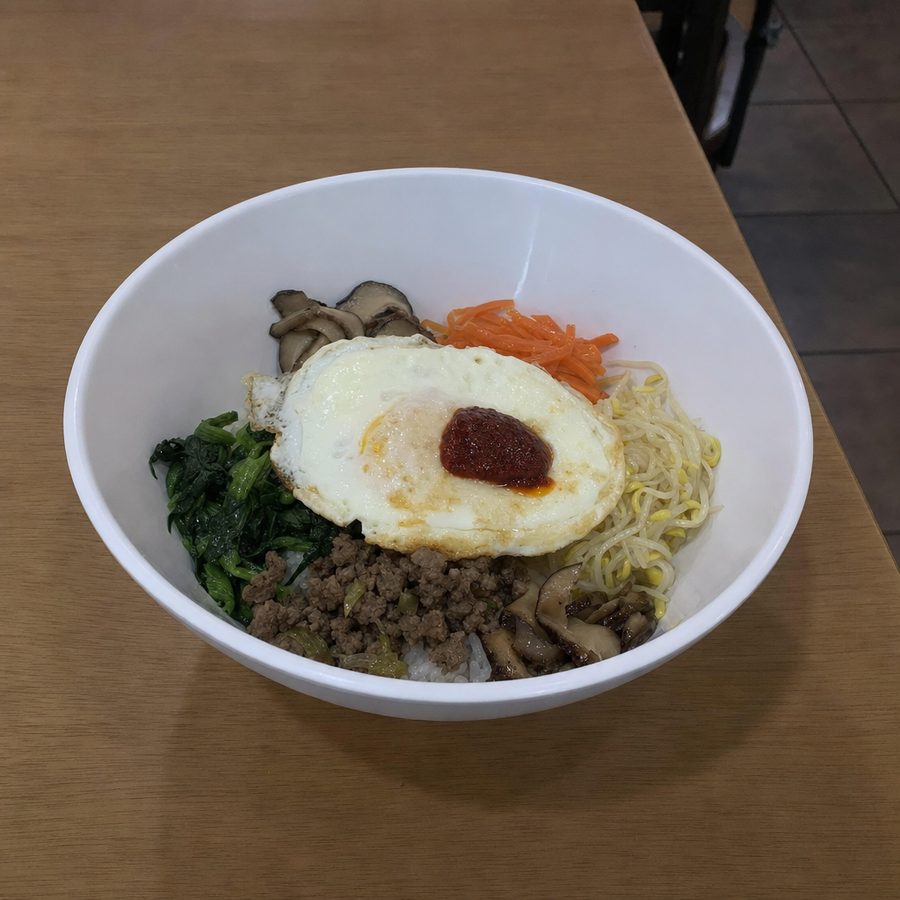
After
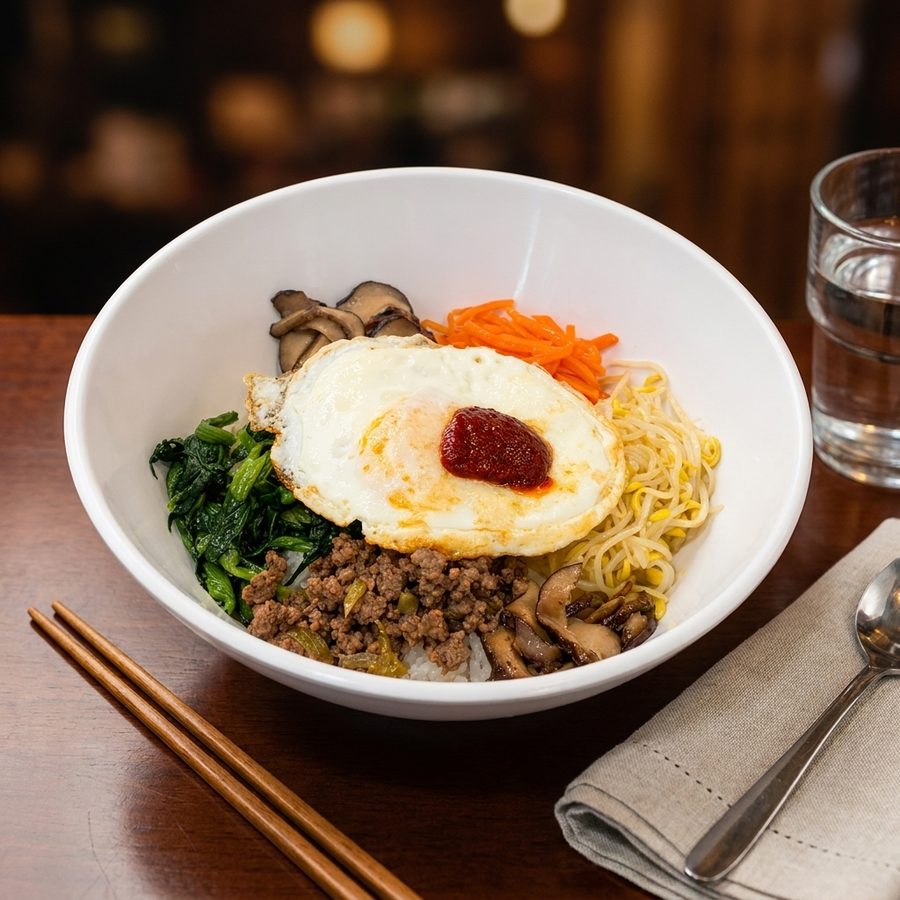
The final image must match the plate the customer receives. Editing may clean the setting and make the real food easier to see, but it should not change ingredients, portion, doneness, included sides, or serving vessel. Delivery platforms require photos to represent the real dish. Check the broader delivery platform photo requirements and the specific DoorDash photo requirements before publishing because crop and content policies can change.
A prompt is only as good as the photo it starts from. The most reliable source is the plate you already serve, captured during a normal shift and cleaned up once with MenuCapture.
No. Every command is written to edit a real dish photo that already exists. The prompts correct presentation, light, background, or framing. They should not add ingredients, increase portions, replace the dish, or promise food that was never served.
A preset applies a fixed group of adjustments whether a photo needs them or not. A text prompt can name the specific problem, protect important details, and state what must remain unchanged. That makes restrained corrections easier to describe across varied restaurant photos.
Yes, but small steps are easier to review. Start with exposure and color, then handle the background, plating marks, and crop. Compare each result with the source photo and stop if an edit changes the portion, ingredients, plate shape, or recognizable character of the dish.
Editing alone does not guarantee compliance. The image must still represent the real menu item, and each platform can set requirements for crops, text, logos, backgrounds, props, or bundled items. Restaurants should check the current destination rules before uploading.
Prompts cannot reliably recover missed focus, reveal food hidden outside the frame, correct the wrong dish, supply missing included components, or turn a false portion into an accurate one. Those problems require a corrected plate and a new photograph.
Name the visible problem, request a modest correction, and say what must stay unchanged. Useful constraints include preserving ingredients, portion, doneness, plate edges, natural shadows, and realistic color. One or two related corrections per pass are easier to assess than a broad makeover.
The Menu Photo Blueprint at /blueprint provides a broader workflow for planning, photographing, and preparing restaurant menu images. Pair that process with this library and adapt each command to the visible issue in the real source photo.
Using AI to clean up plating and background before a photo goes on your menu.
How AI photo editing improves real dish photos, and where it does not fit.
Get a set of prompts for editing dish photos from written instructions without arranging a reshoot.
Compare DSLR, mirrorless, and smartphone cameras, lenses, and settings for restaurant menu photos at different budgets.
MenuCapture helps restaurants turn accurate source photos into clear, consistent menu images with restrained editing.
View pricing